Adjusting AutoClutch Sensitivity and Acceleration Aggressiveness

RXA0104032-UN-22JUL09
Transmission → Advanced Settings
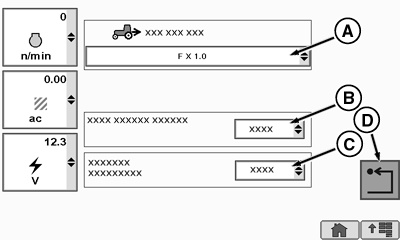
RXA0112567-UN-22DEC10
Transmission Advanced Settings Page
A - Forward/Reverse Ratio Drop Down Box
B - AutoClutch Sensitivity Drop Down Box
C - Acceleration Aggressiveness Drop Down Box
D - Return Softkey
Select Transmission.
Select Advanced Settings softkey.
NOTE: To keep the AutoClutch from disengaging before the trailer brakes are applied, AutoClutch Sensitivity options allows operator to adjust AutoClutch settings to load requirements. The larger the trailer, the lower the AutoClutch Sensitivity setting. Auto Clutch Sensitivity factory default setting is set to High, which will support most operations.
Select AutoClutch Sensitivity drop down box (B).
- High (Factory Default): is for light or no trailer (load).
- Medium: is for medium trailers (load).
- Low: is for heavy trailers (load).
Select appropriate setting.
NOTE: Acceleration Aggressiveness options allows operator to adjust Acceleration Aggressiveness settings to load requirements. The larger the trailer, the lower the Acceleration Aggressiveness setting. Acceleration Aggressiveness factory default setting is set to High, which will support most operations.
Select Acceleration Aggressiveness drop down box (C). Drop down box appears allowing three options. This allows operator the ability to fine-tune acceleration when pulling trailers.
- High (Factory Default): is for light or no trailer (load).
- Medium: is for medium trailers (load).
- Low: is for heavy trailers (load).
Select appropriate setting.
Select Return softkey (D) to return to previous screen.
ZE59858,000041B-19-20110202 |