CommandCenter™ Pages Description And Functions
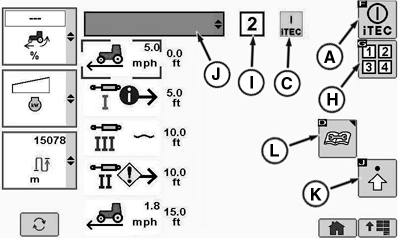
At the iTEC™ Operation Page:

RXA0108933-UN-29JUL10
iTEC™ Shortcut Button
RXA0110476-UN-10SEP10
iTEC™ Operations Page With Field Kit Installed 3 and 4 Sequence Button
RXA0108636-UN-28JUL10
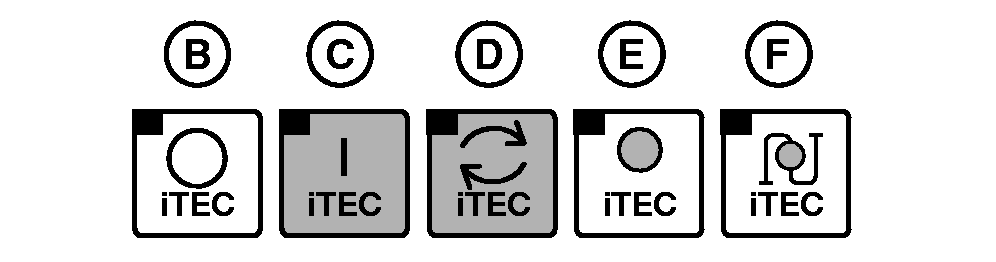
Application Status Options
RXA0107036-UN-16APR10
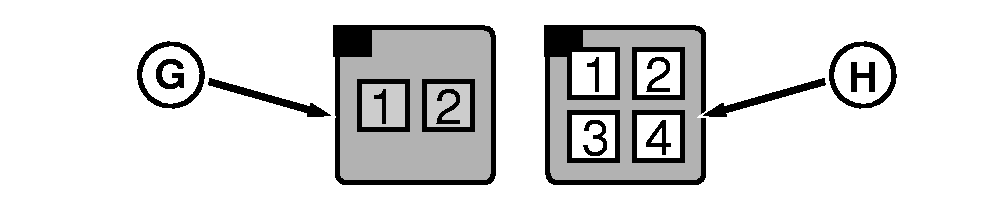
Factory Installed Sequence Softkey 1—2 and Field Installed Kit Option With Sequence Softkey 1—4
A - iTEC™ ON/OFF Softkey
B - OFF Indicator
C - ON Indicator
D - Sequence Executing Indicator
E - Learning Mode Indicator
F - Learning Distance Mode Indicator
G - Sequence Softkey (1 and 2)
H - Sequence Softkey (1, 2, 3, and 4) 1
I - Sequence in Process Indicator Box
J - Implement
K - Advanced Settings
L - Status Page
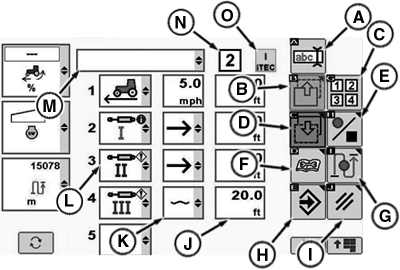
At the iTEC™ Edit Page:

RXA0107044-UN-25MAY10
iTEC™→ Advanced Settings
RXA0110492-UN-08SEP10
iTEC™ Edit Page With Field Kit Installed 1—4 Sequence Softkeys
Select iTEC™.
Select Advanced Settings softkey.
- A—Edit Implement Name Softkey navigates to edit implement name.
- B—Previous Page Softkey
- C—Sequence Softkey toggles between sequences 1—4.2
- D—Next Page Softkey
- E—Start/Stop Record Sequence
- F—Status Page Softkey
- G—Learn Distance Only Softkey3
- H—Enter/Save Softkey
- I— Cancel Softkey
- J— Distance Input Box (Distance at which function listed in left column is triggered after sequence execution.)
- K— Operation Drop Down Box
- L— Function Drop Down Box
- M— Implement Identification Box
- N—Sequence Box displays sequence 2 is active.
- O— iTEC™ is ON
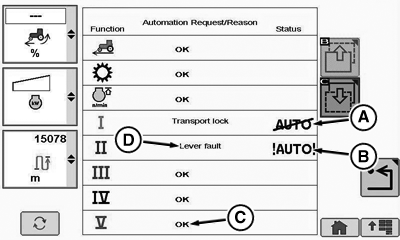
At the iTEC™ Status Page:

RXA0110791-UN-08OCT10
iTEC™→ Status Page
RXA0110793-UN-08OCT10
iTEC™ Status Page
Select iTEC™.
Select Status Page softkey.
- A—Information Alert
- B—Service Alert
- C—Status OK
- D—Reason Function May Not Be Automated
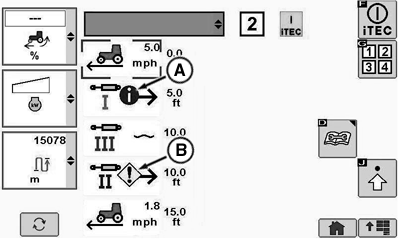
When an Information Alert (A) icon is present, the operator will have manual control of the function. When a Service Alert (B) icon is present, iTEC™ execution of function is not allowed.
The Status Page will display the current conditions of functions that are controlled by iTEC™. The Status column will display if a function has an alert. If there is an alert present, the cause will be displayed in the Automation Request/Reason column. The Automation Request/Reason column will display an OK or a reason for an alert. The Automation Request/Reason column will also display if the function is running under the control of iTEC™. Both the Automation Request/Reason and the Status columns are updated automatically.
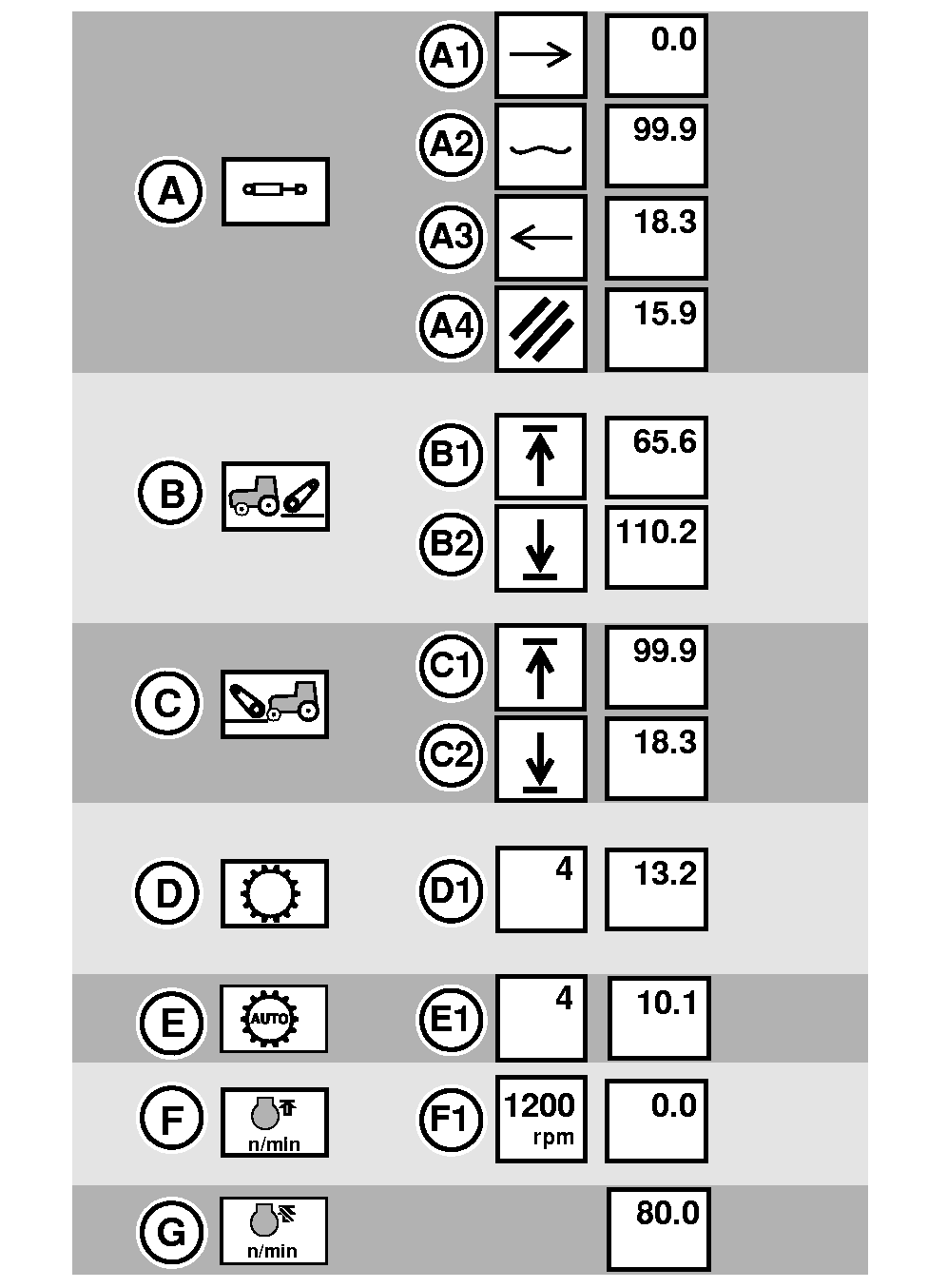
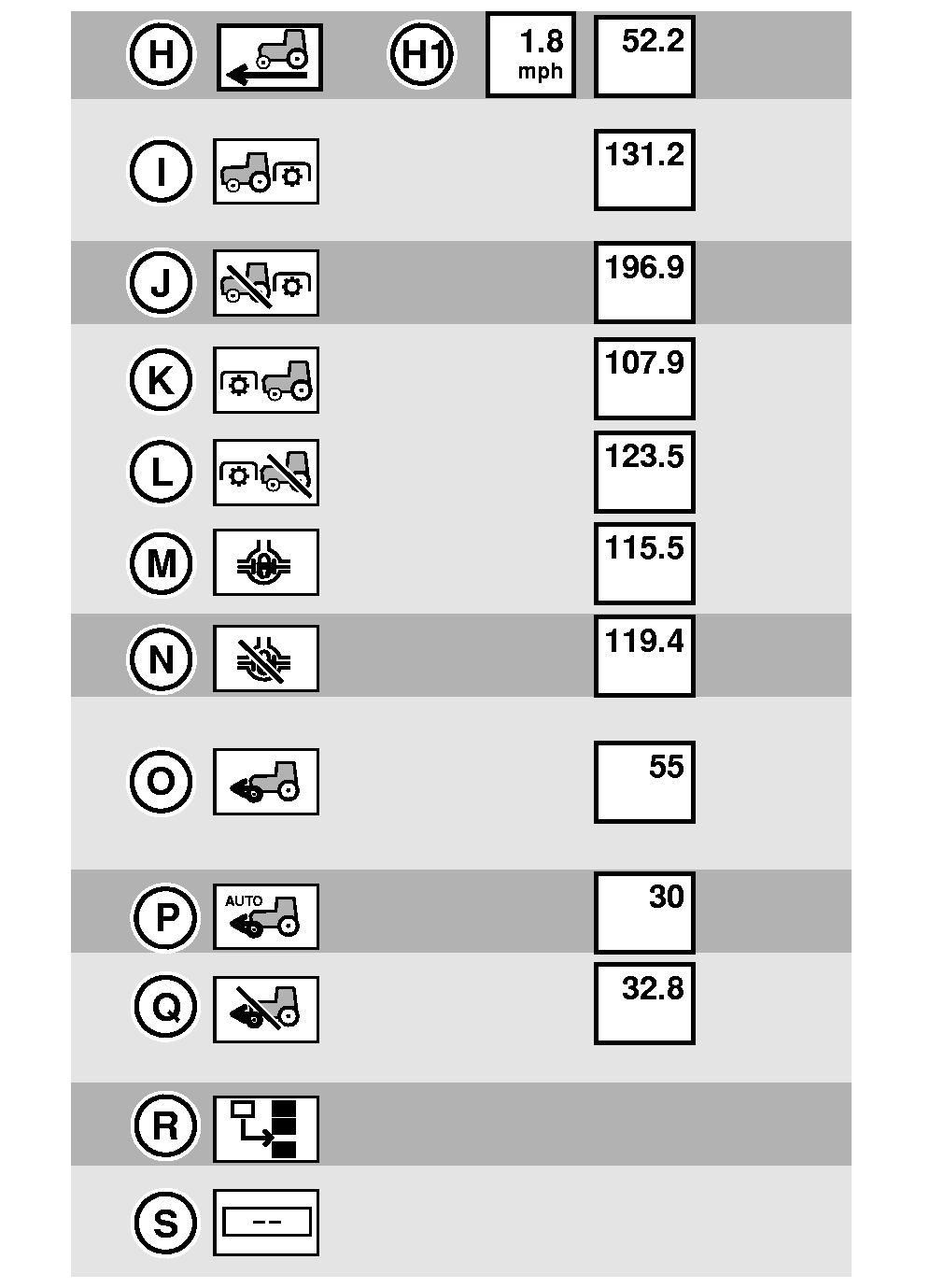
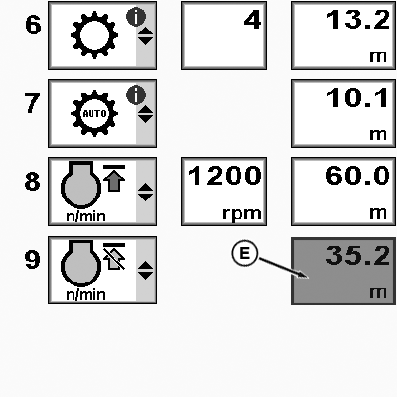
All Function/Operation/Distance Options Found in the Center Region are Indicated Below.
RXA0110723-UN-08OCT10
First Column: Function, Second Column: Operation, Third Column: Distance
RXA0110722-UN-08OCT10
First Column: Function, Second Column: Operation, Third Column: Distance—Continued
- A—SCV’s (I through XIII)
- A-1 Extend
- A-2 Float
- A-3 Retract
- A-4 Cancel
- B—Rear Hitch
- B-1 Raise
- B-2 Lower
- C—Front Hitch
- C-1 Raise
- C-2 Lower
- D—Transmission
- D-1 Gear
- E—AUTO Transmission4
- E-1 Gear
- F—FieldCruise™ On
- F-1 rpm (1100—2200)
- G—FieldCruise™ Off
- H—IVT™/AutoPowr™ Set Speed
- H-1 Speed
0.8—55 km/h (0.5—34.4 mph) both in increments of 0.1
- H-1 Speed
- I—Rear PTO On
- J—Rear PTO Off
- K—Front PTO On
- L—Front PTO Off
- M—Differential Lock
- N—Differential Lock Off
- O—MFWD On
- P—MFWD (Auto)
- Q—MFWD (Brake Assist)
- R—Insert (Used to shift function down while in edit mode.)
- S—Delete
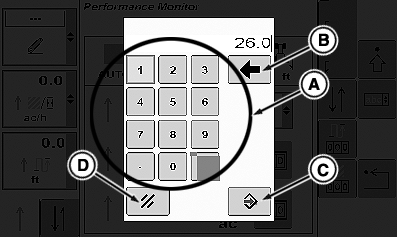
Distance Options are Entered Either in Metric or US/Imperial and Using Either Key Pad or Input Box
RXA0107389-UN-16APR10
Keypad To Set Distance
RXA0108932-UN-27JUL10
Distance Input Box On iTEC™ Edit Page
A - Keypad
B - Backspace
C - Save/Enter
D - Cancel
E - Input Box
Entering US/Imperial distances or when using touchscreen:Select Distance input box.
NOTE: To make a correction on keypad, select backspace key (B).
When keypad displays, select desired distance by selecting appropriate keypad (A) numbers, then select enter button (C). Cancel by selecting cancel button (D).
Entering metric distances or when using thumb wheel:
Select Distance input box (E).
Input box highlights, then scroll forward to increase numbers or rearward to decrease value in input box.
Select CommandARM™ Confirm button.
NOTE: A - Information Alert, Function Limited - will display if function is not in correct state when sequence is in passive mode, programmed, but not executing. (Ex: PTO Switch Off).
RXA0110484-UN-10SEP10
Function Limited Alerts
A - Information Alert— Function Limited
B - Service Alert—Function Limited
B - Service Alert, Function Limited - Function will not execute while in execution mode and some conditions may be related to a Service Alert for that function. (Ex: PTO Switch Fault).
Function Limited | Corrective Action |
Differential Lock | Vehicle speed is above threshold to turn off differential lock. |
PTO | Switch is not in the ON-position. |
Vehicle Speed | Right Hand Reverser (If Equipped) is in Reverse |
Current Set Speed < 0.8 km/h | |
Transmission not in AUTO Mode | |
Rear hitch | Rear Hitch Locked |
Front Hitch | Front Hitch Locked |
Front Hitch not in front hitch mode | |
SCV | SCV locked |
FieldCruise™ | Access Manager has FieldCruise™ locked |
See iTEC™ Status Page in this section for more information about why a service or information alert is present.
iTEC is a trademark of Deere & Company FieldCruise is a trademark of Deere & Company CommandARM is a trademark of Deere & Company 1 Sequence 3 and 4 can be added when Field Installed Kit is installed through your John Deere™ dealer. 2 Factory installed softkey. 1 through 4 Softkey available with Optional Field Installed Kit, see your John Deere™ dealer. 3 If only one function is in the sequence, Learn Distance Only softkey is grayed out (not functional) 4 If CommandQuad™ transmission is in AUTO mode, this function can change gears within a range but cannot change ranges. | ZE59858,0000426-19-20110221 |