Recording A Sequence While Driving
NOTE: The tractor can not be in park while learning a sequence. Tractor drive lever must be in a forward position to begin learning or executing set speeds or gears.
During Learn mode, the set speed may be changed more than once. iTEC™ will record the time of the first set speed change in the sequence. If additional changes occur at less than two second intervals, they will be combined with the first into a single event. The final set speeds in the two second intervals will be recorded.
Select iTEC™.

RXA0108933-UN-29JUL10iTEC™
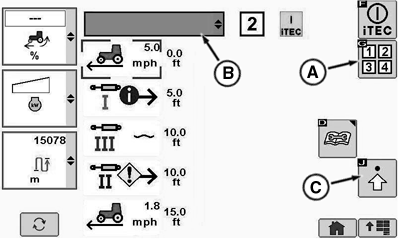
RXA0110485-UN-10SEP10Operations Page
A - Sequence Softkey
B - Implement Name Drop Down Box
C - Advanced Settings Softkey
Select iTEC™ softkey.
NOTE: If iTEC™ is on and recording, iTEC™ icon is highlighted and flashing. When sequence is selected, that sequence number is displayed on page.
Select Sequence softkey (A) for sequence 1 or 2.
Select Implement Name drop down box (B). Drop down opens displaying list of loaded implement names.
NOTE: If implement name has not been loaded or requires editing, refer to Entering Or Editing Equipment Name in this section of the Operator’s Manual.
Select desired implement name in drop-down box.
Select advanced settings softkey (C) to go to iTEC™ Edit page which allows modification to sequence, equipment, function, operation, or distance.
Select Start/Stop Record Sequence softkey (A).
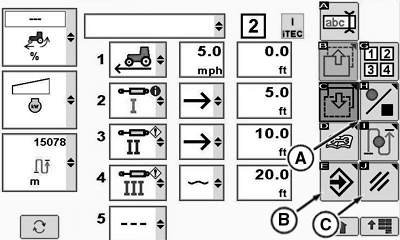
RXA0110490-UN-08SEP10iTEC™ Edit Page
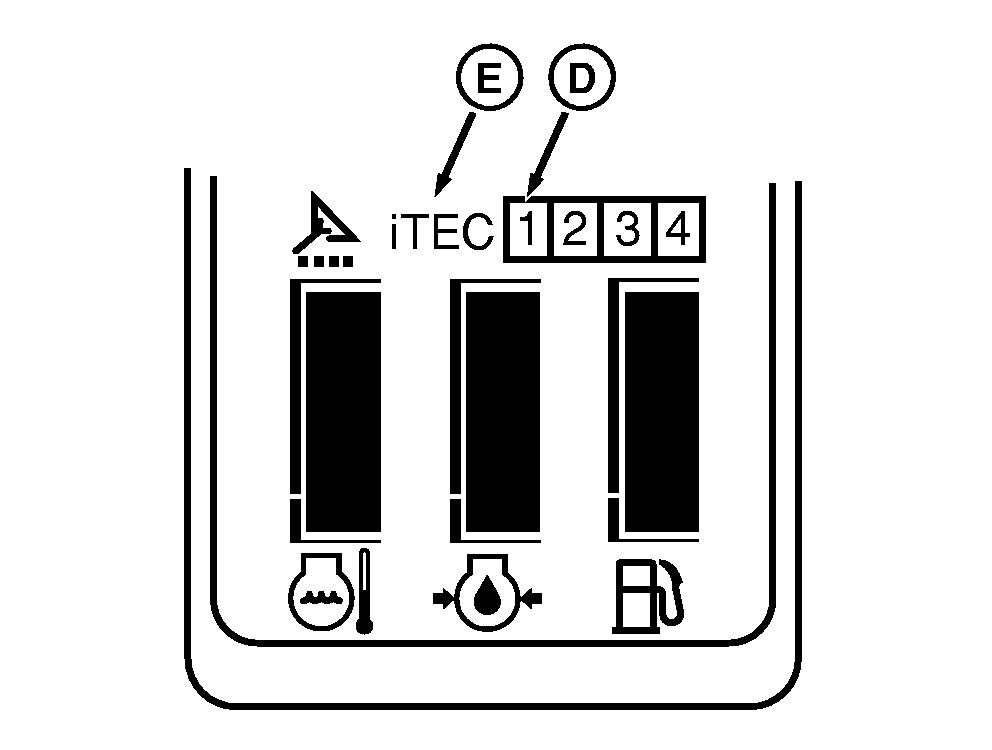
RXA0109226-UN-30JUL10Corner Post Display
A - Start/Stop Record Sequence Softkey
B - Save/Enter Softkey
C - Cancel Softkey
D - Sequence Number
E - iTEC™
NOTE: For a complete list of functions available, see Description And Display in this section of Operators Manual.
Sequence can be aborted at anytime by selecting Cancel softkey (C).
While recording sequence number (D) and iTEC™ (E) will display on display.
Place tractor in motion and operate functions manually.
After all functions are loaded, select Save/Enter softkey (B).
ZE59858,000042A-19-20101105 |