Learn Distance Only

RXA0108922-UN-28JUL10
iTEC™→Advanced Settings
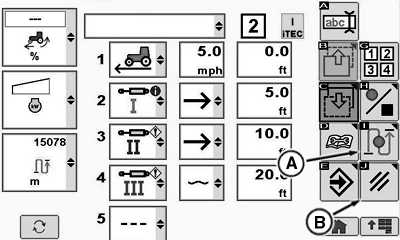
RXA0110491-UN-08SEP10
Edit Page
A - Learn Distance Softkey
B - Cancel Softkey
NOTE: Learn Distance can be used to either learn the distances for a sequence setup via EDIT or to relearn distances for an existing sequence. The sequence must contain at least two functions to be able to start Learn Distance.
Select iTEC™.
Select iTEC™ ON/OFF softkey.
Select Advanced Settings softkey.
For a sequence with at least two functions select Learn Distance softkey (A).
Drive a speed greater than 0.5 km/h (0.31mph) and select the associated sequence switch at the desired position where each function gets executed.
NOTE: By selecting the sequence switch the highlighted function and distance are learned, the function executes, and the highlight moves to the next step.
Learn Distance ends automatically when all distances are learned.
To cancel learn distance, select Cancel softkey (B).
ZE59858,000042B-19-20101105 |