Adjusting Hitch Raise Rate
IMPORTANT: Excessive drop speed may cause injury or machine damage. Fully lowering implement should take at least 2 seconds.
At the CommandCenter™ main menu select hitch icon.
Press raise rate softkey (A).
RXA0098114-UN-07NOV08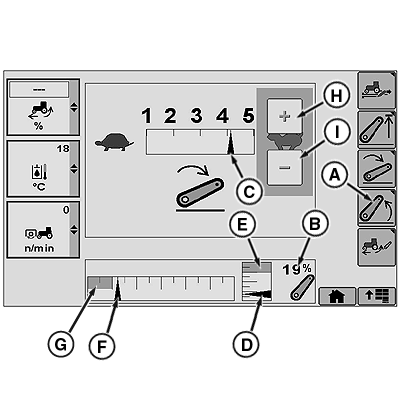
RXA0113359-UN-11FEB11A - Raise Rate Softkey
B - Hitch Position Value
C - Raise Rate
D - Hitch Position Indicator
E - Upper Set Limit
F - Commanded Depth Indicator
G - Operating Depth Indicator
H - Touch Screen Increase Value (If Equipped)
I - Touch Screen Decrease Value (If Equipped)
Observe display. Raise rate setting is indicated by raise rate (C).
NOTE: Changes to raise rate will take place immediately.
ZE59858,0000457-19-20110119 |