Using Float Operation
Implements that fully rest on gauge wheels to control depth, require that the hitch floats to follow ground contour.
RXA0107327-UN-16APR10
Hitch Load Depth
RXA0113364-UN-11FEB11
Hitch Load Depth
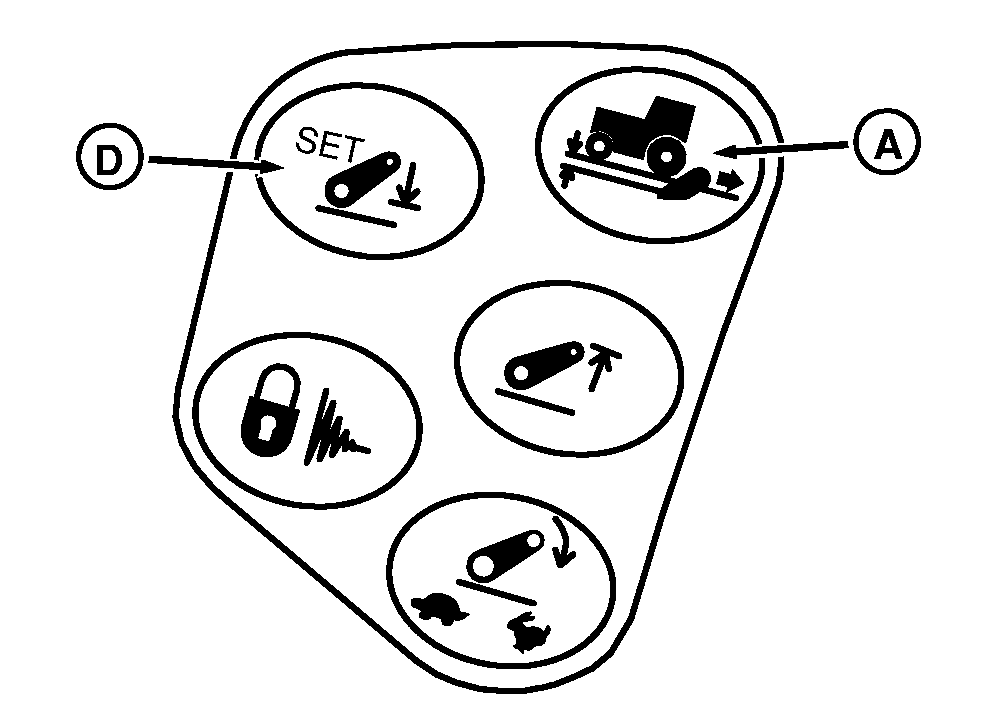
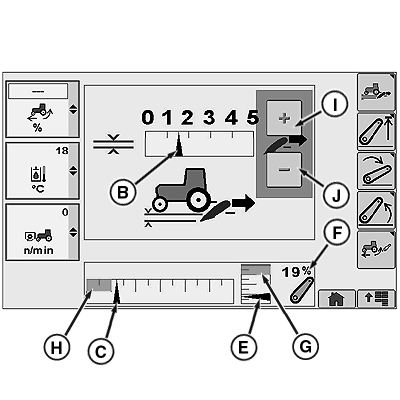
A - Load/Depth Shortcut Button
B - Load/Depth Setting Indicator
C - Commanded Depth Indicator
D - Hitch Lower Limit Shortcut Button
E - Hitch Position Actual
F - Hitch Position Value
G - Upper Limit
H - Hitch Lower Set Point
I - Touch Screen Increase Value (If Equipped)
J - Touch Screen Decrease Value (If Equipped)
Select Load/Depth shortcut button (A).
Set load/depth setting bar graph indicator (B) to far left position, minimum setting.
Hold hitch lever forward until commanded depth indictor (C) is in full down position.
Press hitch lower limit shortcut button (D) to save full down as stored depth setting.
NOTE: Position indicator (E) indicates actual hitch position.
Lift links can be adjusted for lateral float. See Changing Lateral Float in this section.
ZE59858,0000459-19-20110119 |