External Rear PTO Switch (If Equipped)
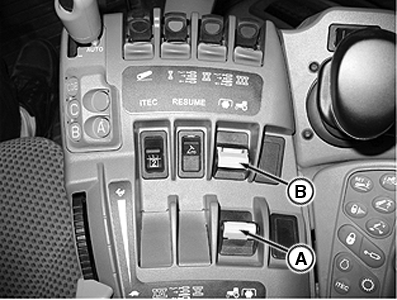
RXA0109350-UN-10AUG10
CommandARM
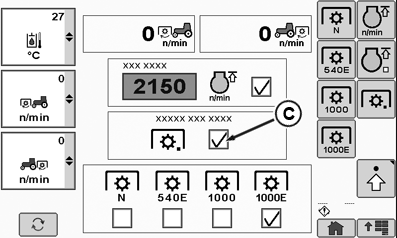
RXA0112532-UN-14DEC10
CommandCenter™ PTO Home Page
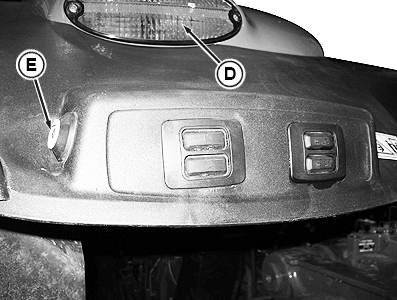
RXA0109354-UN-09FEB11
Right-Hand Side Fender
A - Rear PTO Switch
B - Front PTO Switch (If Equipped)
C - External PTO Switch Enable Check Box
D - Hazard Warning Light
E - External Rear PTO Switch
Rear PTO can be operated from outside of cab.Push down and forward on rear PTO switch (A). Rear PTO indicator will light on display. A continuous audible warning will sound and hazard warning lights (D) will flash. (PTO has not started yet).
Activate the External PTO Switch Enable Check Box (C) on the CommandCenter™ to enable the external rear PTO switch (E).
Press and hold rear external PTO switch (E). Rear PTO will start slowly. Hazard warning lights will go out.
- Press and hold switch for at least 4 seconds:
- Hazard lights turn off
- PTO continues to operate
- Release switch within 4 seconds:
- PTO will slowly stop
- A continuous audible warning will sound
- Hazard warning lights will flash
- Press and hold switch for at least 4 seconds:
Shut off rear PTO by pressing rear external PTO switch (E) [an audible warning will sound intermittently and hazard warning lights (D) will flash] OR pull back rear PTO switch (A) inside cab.
Return PTO switch function to normal operation by pressing the PTO preselector switch (A) top half to disable the external PTO switch.
NOTE: If rear PTO is switched on in cab, rear PTO may be shut off at the external PTO switch, but cannot be switched on again without re-entering cab.
CommandCenter is a trademark of Deere & Company | ZE59858,000047B-19-20101130 |