Operating the Phone Through the CommandCenter™
RXA0113276-UN-27JAN11
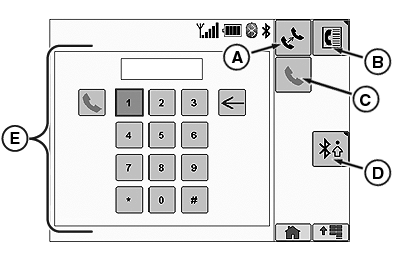
A - Transfer Call
B - Phone Book
C - Dial Phone Number
D - Bluetooth® Settings
E - Phone Softkeys
To place a call, enter the phone number with the number softkeys. Next select the Dial Phone Number softkey (C).
While in a call, an In Call Phone popup will display name, contact information, and number.
While in a call, use the Transfer Call softkey (A) to transfer the call to your cell phone. When transfer is completed Call Transferred will be displayed.
The Phone Book softkey (B) will transfer you to the Phone Book page (see Phone Book on the CommandCenter™ in this section). The Bluetooth® Settings softkey will transfer you to the Bluetooth® Settings page (see Premium Radio Settings on the CommandCenter™ in this section).
NOTE: Phone softkeys (E) and phone book softkey (B) are not available while in a call. Use your cell phone if you need to use numbers while in a call.
Bluetooth is a trademark of Bluetooth SIG CommandCenter is a trademark of Deere & Company | ZE59858,000068E-19-20110221 |