Premium Radio Settings on the CommandCenter™
RXA0113218-UN-27JAN11
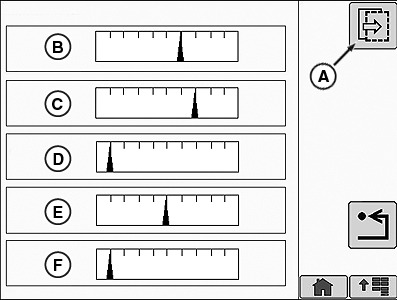
Radio Settings Page 1
RXA0113234-UN-27JAN11
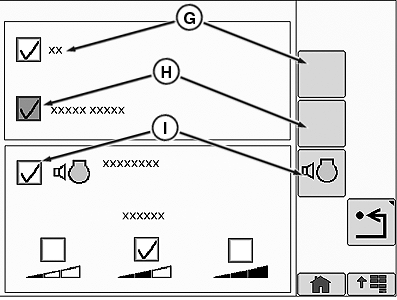
Radio Settings Page 2
A - Next Page
B - Bass
C - Treble
D - Middle
E - Balance
F - Fade
G - Alternate Frequencies (AF)
H - Traffic Announcements (TA)
I - Volume Compensation
The operator can change Bass (B), Treble (C), Middle (D), Balance (E), and Fade (F) on Audio Settings page 1. Traffic Announcements (H) and Volume Compensation (I) are located on Audio Settings page 2. Traffic announcements are a radio frequency that is displayed on the FM Home Page (see Premium Radio AM/FM Home Page on the CommandCenter™ in this section). To enable Traffic Announcements, select the Alternate Frequencies check box or softkey (G) first. This will enable the Traffic Announcements option. Select the Traffic Announcements check box or softkey (H) to turn on Traffic Announcements. Traffic Announcements are shown in the FM Home Page. Volume compensation automatically adjusts the radio’s volume based on external noise. To enable/disable volume compensation select the volume compensation check box (I). Volume sensitivity can be adjusted to low, medium, or high.
CommandCenter is a trademark of Deere & Company | ZE59858,0000694-19-20110221 |