Configuring Home Page
-
Select Menu button.

RXA0116492-UN-11MAY11CommandARM™ Controls Menu Button→Layout Manager Icon
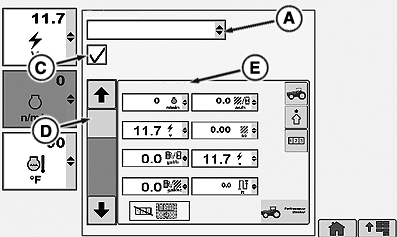
RXA0106103-UN-20AUG10Layout Manager—Selected Home Page
A - Region Drop Down Box
B - Page Name
C - Home Page Cycle Check Box
D - Desired Softkey
-
Select Layout Manager.
-
Layout Manager will open in the home page that was last used.
-
Select Region drop down box (A) to display options which include 3 home page options and 10 softkeys options.
↑
Home Page 1
Home Page 2
Home Page 3
Softkey A
Softkey B
Softkey C
Softkey D
Softkey E
Softkey F
Softkey G
Softkey H
Softkey I
↓
Softkey J
-
Place check in Home Page Cycle check box (C) to have desired page displayed.
-
To view home pages after they are included in the home page cycle, select CommandARM™ Home button displaying home page 1. Selecting Home button repeatedly displays consecutive home pages, 1, 2, or 3.
-
Open drop down box (A) to select pages or softkeys available for your tractor configuration.
NOTE: Page Name (B) is printed across the top of page. Not all pages are identified with a specific page name.
-
To remove page from Layout Manager, remove check from check box (C). Check box is deactivated and page is no longer displayed in Layout Manager.
-
The 10 softkeys can also be programmed with the softkey options available to each. The selected softkey would then appear on the selected home page.
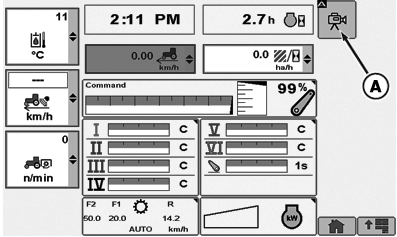
The default home page can be configured to monitor a number of ongoing tractor functions, of which (A) is an example and normally monitored in the left region.
RXA0116492-UN-11MAY11
CommandARM™ Controls Menu Button→Layout Manager Icon
RXA0116773-UN-16MAY11
Default Home Page
RXA0110932-UN-16SEP10
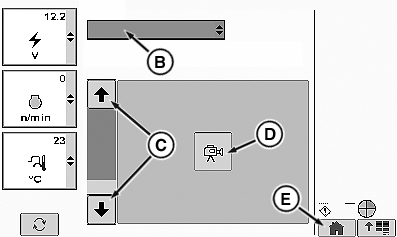
Adding Video Softkey
A - Softkey (Video)
B - Region Drop Down Box
C - Arrow Up/Down
D - Softkey (Video)
E - Home
NOTE: Softkey layouts are only visible on home pages that support reconfigurable softkeys.
To add configurable softkey to home page:
-
Select Main Menu.
-
Select Layout Manager.
-
Select Region drop down box (B).
-
Select desired softkey A though J (softkey E in this example).
-
Using Up/Down arrows (C) scroll to desired configurable softkey (D).
-
Select Home softkey (E) at the bottom of right region.
-
Selected softkey (A) is then added to right region of home page.
|
CommandARM is a trademark of Deere & Company |
GH15097,000059D-19-20120416 |