Using External Rear PTO Switch

RXA0104058-UN-22JUL09
RXA0110943-UN-16SEP10
RXA0109460-UN-16AUG10
RXA0109459-UN-16AUG10
Right-Hand Side Fender
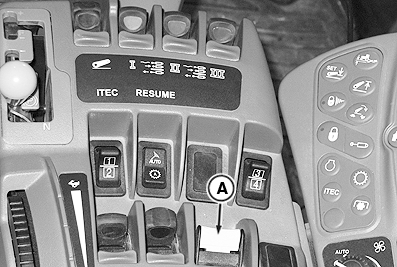
A - Rear PTO Switch
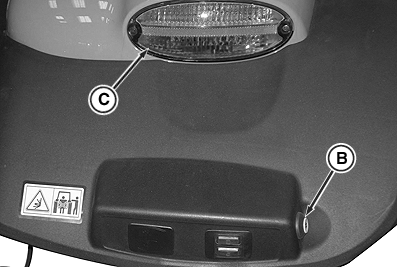
B - External PTO Switch
C - Hazard Warning Light
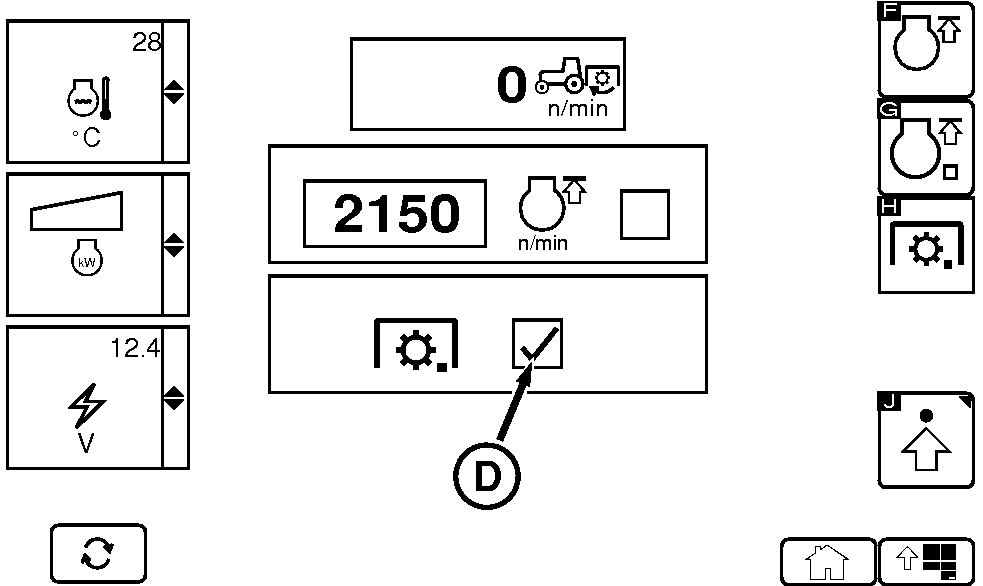
D - Rear PTO Engagement Check Box
Rear PTO can be operated from outside of cab.-
Select CommandARM™ Controls PTO Shortcut button.
NOTE: When softkey H is selected, the Rear PTO Engagement check box (D) is checked. Each time ignition key is cycled, Rear PTO Engagement check box must be selected (checked) again.
-
Select Rear PTO Engagement softkey H.
-
Push down and forward on PTO switch (A). Rear PTO and Service Alert indicators will appear on corner post display, audible alarm sounds 5 times, hazard warning lights (C) flash, and REAR PTO EXTERNAL CONTROL SWITCH ACTIVE displays on CommandCenter™. Rear PTO is not engaged yet.
-
To continuously engage rear PTO, press and hold external rear PTO switch (B) until hazard warning lights (C) stop flashing. Cornerpost and CommandCenter service alert will disappear.
To engage the rear PTO for only a short period of time, for example, to align the splines with the splines on the implement, press and release external PTO switch (B) while hazard warning lights are flashing. Cornerpost and CommandCenter service alert appear. Hazard warning lights continue to flash.
To disengage rear PTO, press and release external PTO switch or pull back Rear PTO switch at any time. Cornerpost and CommandCenter service alert will appear. Hazard warning lights begin flashing.
|
CommandARM is a trademark of Deere & Company CommandCenter is a trademark of Deere & Company |
OURX935,00000A0-19-20120402 |