Adjusting ActiveSeat (If Equipped)
NOTE: Before operating tractor, adjust ActiveSeat to your height and weight. This will allow you to get the most from ride zone protection. ActiveSeat has a built-in buffer at the high and low end of vertical seat travel, resulting in a much smoother ride.
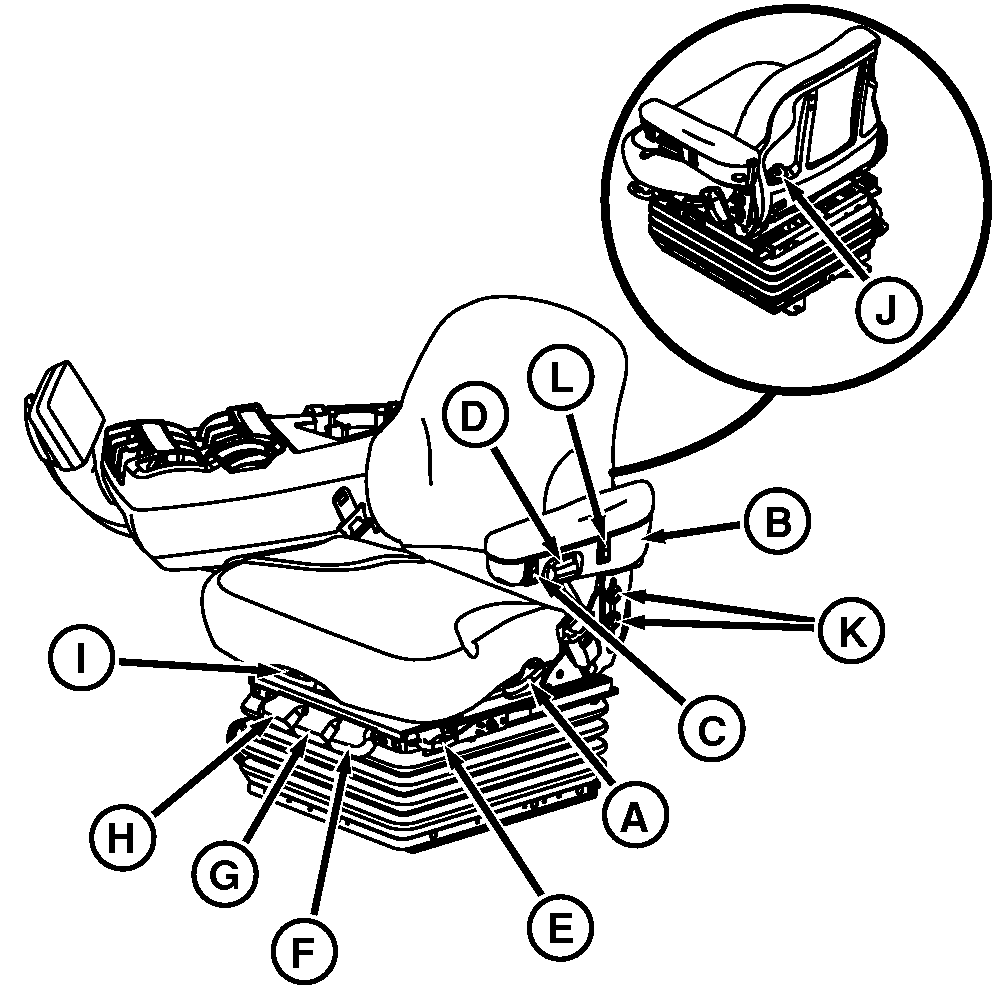
RXA0099795-UN-16DEC08
A — Back Tilt Handle (A) - Allows seat back to tilt.
B — Flip Up Armrest (B) - Can be flipped up out of the way.
C — Height Adjustment (C) - Turn key to ”ON”. Press lower portion of switch to lower seat or press upper portion of switch to raise seat.
D — Tilt Adjustment Knob (D) - Turn knob to adjust armrest angle.
E — Fore Aft Adjustment Handle (E) - Allows entire seat assembly to slide forward or backward.
F — Fore-Aft Isolation Handle (F) - Push down on handle to allow operator seat to slide forward or backward. Pull up on handle to lock seat in place.
G — Lateral Isolation Handle (G) - Push down on handle to unlock lateral seat suspension. Pull up on handle to lock seat in position.
H — Adjustment Damper (H) - Reserved for Air Suspension Seat only.
I — Seat Swivel (I) - Lift on handle to allow seat to swivel. Push down on handle to lock seat in position.
J — Lumbar Adjustment Knob (J) - Turn clockwise to add support to lower back. Turn counterclockwise to lessen resistance to lower back.
K — Armrest Adjustment (K) - Loosen cap screws to slide arm rest up or down. Retighten cap screws.
L — Firmness Adjustment (L) - provides three different levels of seat suspension performance. Press upper portion ”+” of switch for the firmest ride or lower portion ”—” for the softest ride.
Ride Zone Protection - The seat is ride zone protected. The seat will automatically adjust back into the protected zone when operator adjusts the seat height position at or near the vertical seat travel limits.
|
OURX935,000025B-19-20110803 |