Using TouchSet Depth Controls
RXA0099916-UN-08DEC08
RXA0107016-UN-02AUG10
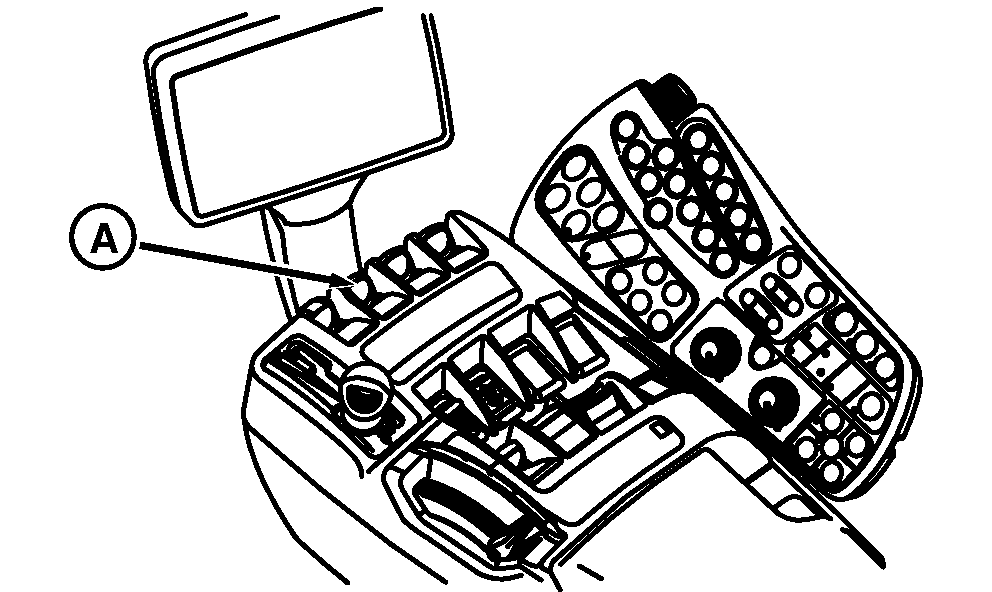
A - SCV I Control Lever
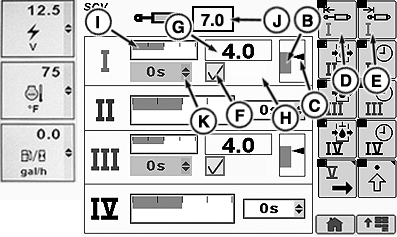
B - Implement Range
C - Implement Indicator
D - Extend Set Softkey
E - Retract Set Softkey
F - Feature Mode Check Box
G - Implement Position
H - Feature Mode Status
I - Detent Flow Bar Graph
J - Detent Flow Box
K - Detent Time Drop Down Box
 CAUTION: Avoid personal injury
or death. Do not attempt to install depth control sensors on implements
not intended for this system. See implement operator's manual.
CAUTION: Avoid personal injury
or death. Do not attempt to install depth control sensors on implements
not intended for this system. See implement operator's manual.
Moving implement control unit, sensor, connectors, or linkages, when engine is running, may cause unexpected movement. Stay clear of implement when starting engine.
Tractor selective control valve (SCV I) is used to electronically control raising, lowering, and setting of implement depth, without leaving the cab.
-
Connect implement to tractor.
NOTE: When using TouchSet, SCV must be set for feature mode. See Hydraulics and Selective Control Valves Section.
Height setting is the upper edge of grayed area, implement range (B). The lower limit (depth setting) is the bottom portion of the implement range. Actual implement position is depicted by indicator (C).
Moving SCV 1 lever (A) into extend or retract detent position with TouchSet in AUTO (H) will command the implements's position to the respective established set point.
Rapidly moving SCV I lever into extend or retract region and returning to center position with TouchSet in AUTO will adjust the implement's position up or down by a fixed amount. Repeated lever ”flick” movements will be summed.
-
Using SCV I lever, lower implement to desired depth while watching implement and CommandCenter Implement Position (G).
-
When implement is at desired depth, rotate thumb wheel to extend softkey (D) and select by pressing Confirm button.
-
Using SCV I lever, raise implement to desired height while watching implement and CommandCenter implement range.
-
When implement is at desired height, rotate thumb wheel to retract softkey (E) and select by pressing Confirm button.
-
Rotate thumb wheel to bar graph (I). Press Confirm button to highlight. Rotate thumb wheel to adjust flow. Press Confirm button again.
NOTE: Bar graph (I) depicts detent flow and amount of detent flow will be shown in box (J). Detent time drop down box (K) cannot be adjusted when feature mode check box (F) is checked. See Standard Mode in Hydraulics and Selective Control Valves Section.
|
OURX935,0000261-19-20110718 |