Hitch Set-up and Use (Quick Reference)
RXA0107323-UN-16APR10
Shortcut Buttons
RXA0113352-UN-11FEB11
Softkeys
RXA0107248-UN-07APR10
Hitch Lever
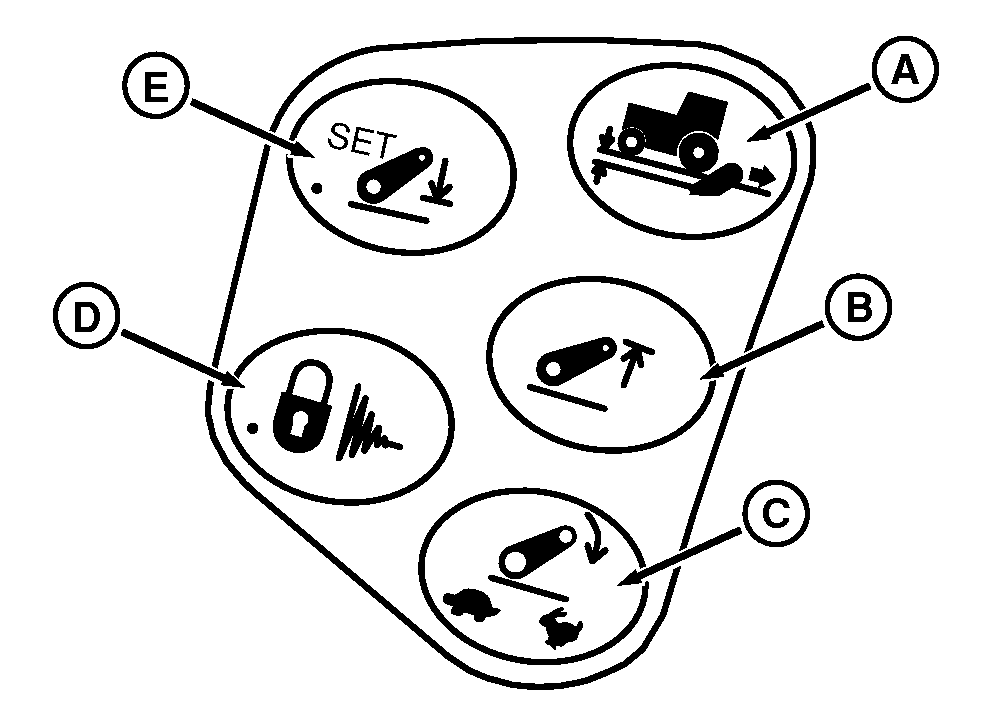
A - Load Depth Shortcut Button
B - Upper Limit Shortcut Button
C - Drop Rate Shortcut Button
D - Hitch Lock/Dampening Shortcut Button
E - Depth Set Shortcut Button
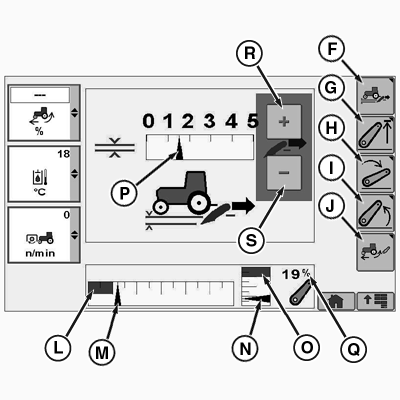
F - Load Depth Softkey
G - Upper Limit Softkey
H - Drop Rate Softkey
I - Raise Rate Softkey
J - Hitch Slip Softkey
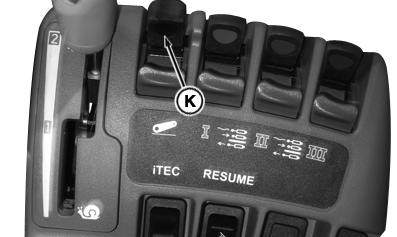
K - Hitch Command Lever
L - Saved Operating Depth Indicator
M - Commanded Depth Indicator
N - Position Indicator
O - Hitch Upper Set Limit
P - Load Depth
Q - Hitch Position Value
R - Touchscreen Increase Value (If Equipped)
S - Touchscreen Decrease Value (If Equipped)
Select desired page by pressing required shortcut button (A, B, C, or E).
- A—Load Depth shortcut button
- B—Upper Limit shortcut button
- C—Drop Rate shortcut button
- E—Depth Set shortcut button
Three options are available to navigate through CommandCenter pages. The operator can choose which method is most comfortable to make selections.
- Rotate thumb wheel to a specific box or softkey and press Confirm button.
- Use softkeys to quickly navigate through system to a page, then use thumb wheel to specific portion of a page.
- For tractors equipped with Touchscreen CommandCenter touch specific softkey, button or icon to make a selection. To increase or decrease adjustments, glide finger along bar graph or select increase/decrease value button (R or S) respectively.
- Lower implement to desired operating depth using Hitch Command lever (K).
- Select Depth Set shortcut button (E) to save operating depth.
Set Operating Depth
- At end of field, pull lever into raise detent and release. Hitch will raise to upper height limit.
- After turnaround, push lever into lower detent and release. Hitch will lower to saved depth setting.
Turn at End
Hitch command information appears in lower portion of hitch pages. Commanded depth or lower set point is represented by commanded depth indicator (M). Hitch lower limit is represented by saved operating depth indicator (L). Pressing depth set button will move and align saved operating depth indicator with commanded depth indicator. Hitch position value (Q) represents actual hitch position in percentage while actual hitch position is displayed by hitch position indicator (N). When hitch is completely down, the hitch position value is 0%. When hitch is completely up, the hitch position value is 100%.
|
OURX935,000028C-19-20110609 |