Using Float Operation
Implements that fully rest on gauge wheels to control depth, require that the hitch floats to follow ground contour.
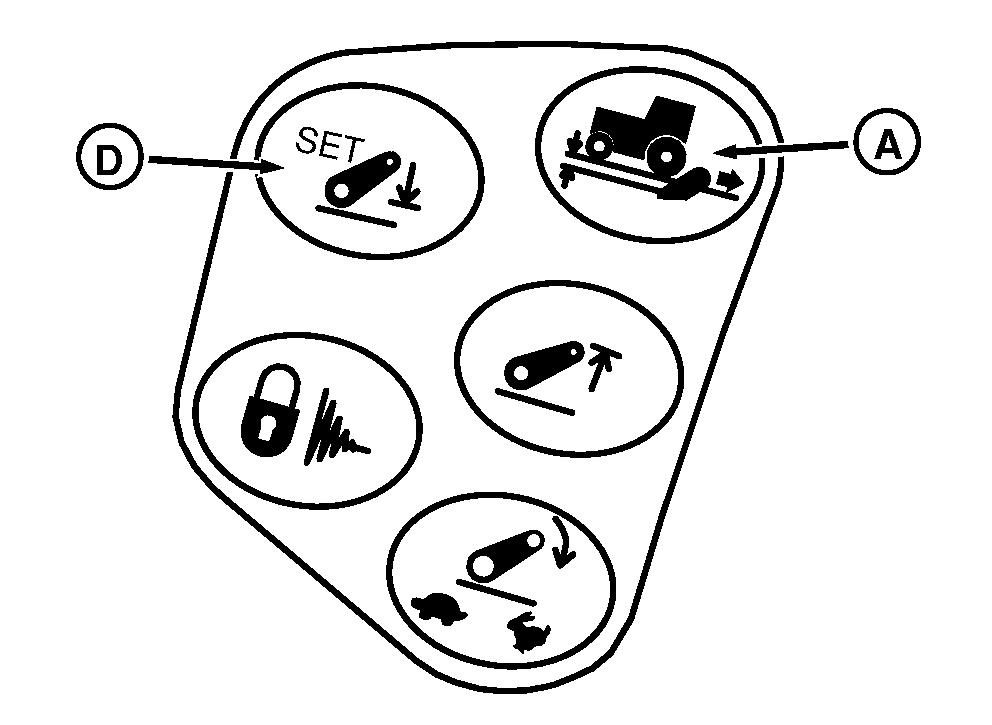
RXA0107327-UN-16APR10
Hitch Load Depth
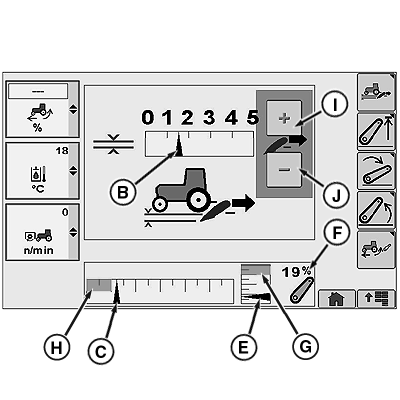
RXA0113364-UN-11FEB11
Hitch Load Depth
A - Load/Depth Shortcut Button
B - Hitch Response Indicator
C - Commanded Depth Indicator
D - Depth Set Shortcut Button
E - Position Indicator
F - Hitch Position Value
G - Upper Set Limit
H - Stored Operating Depth Indicator
I - Touchscreen Increase Value (If Equipped)
J - Touchscreen Decrease Value (If Equipped)
-
Select Load/Depth shortcut button (A).
-
Set load/depth setting bar graph indicator (B) to far left position, minimum setting.
-
Hold hitch lever forward until commanded depth indictor (C) is in full down position.
-
Press Depth Set shortcut button (D) to save full down as stored depth setting.
NOTE: Position Indicator (E) indicates actual hitch position.
-
Lift links can be adjusted for lateral float. See Changing Lateral Float in this section.
|
OURX935,0000295-19-20110609 |