CommandCenter™ Menu
RXA0116467-UN-11MAY11
CommandARM Controls Menu Button
RXA0116479-UN-10MAY11
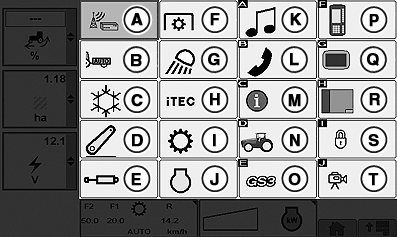
CommandCenter Menu

RXA0117313-UN-18MAY11
CommandCenter Menu Softkey Located On The Bottom Right Corner Of Pages
At the CommandARM Controls press Menu Button. Depending on tractor configuration, the number and order of displayed icons vary. From the CommandCenter Menu, operator can display any main page available. A brief description of each is listed:
- A — Remote Software Update: Download, install, or cancel software updates. (See Remote Software Update in this Section).
- B — Tractor Implement Automation 1(See Tractor Implement Automation Section).
- C — ClimaTrak:ClimaTrak Adjust ClimaTrak settings. (See Operator Station section).
- D — Hitch: Adjust Hitch. (See Hitch Section).
- E — SCV: Adjust any of up to six SCVs. (See Hydraulic and Selective Control Valves section).
- F — PTO: Adjust PTO speed. (See Drawbar and PTO section).
- G — Lights: Adjust lighting. (See Lights section).
- H — iTEC: Adjust iTEC functions. (See Intelligent Total Equipment Control section).
- I — Transmission: Adjust either PST (See PowerShift Transmission Section) or IVT and AutoPowr Settings. (See IVT and AutoPowr section).
- J — Engine: Adjust FieldCruise setting or engine rpm. (See Operating The Tractor section).
- K — Radio: Adjust premium radio only. (See Operating The Radio section).
- L — Phone: Make or receive calls through CommandCenter™ (See Operating The Radio section).
- M — Message Center: Manages Message Center. (See Message Center in this section).
- N — Performance Monitor (See Using Performance Monitor Main in this section).
- O — GreenStar (See appropriate Operator's Manual for GreenStar Applications.)
- P — Original GreenStar: Adjust GreenStar components. (See Operator section).
- Q — Display: Adjust Display functions. (See Display in this section).
- R — Layout Manager: Adjust Layout Manager functions. (See Lay Out Manager in this section).
- S — Access Manager: Adjust Access Manager functions. (See Access Manager in this section).
- T — Video: (See Accessing Video Capabilities in this section).
- U — Menu Softkey: located at the bottom of most pages allows operator to be able to return to main menu from this point.
|
1 Compatible Implement Required
|
OURX935,00002C5-19-20130904 |