Calibrating Dual Beam Radar—Performance Monitor Setting
RXA0116559-UN-20JUN11
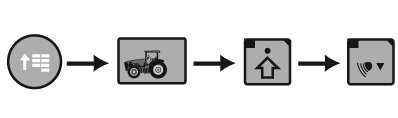
CommandArm Menu Button → Performance Monitor → Performance Monitor Settings → Calibrate Radar
RXA0117185-UN-09JUN11
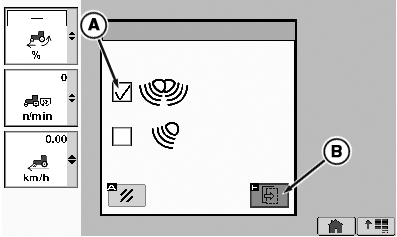
Calibrate Radar Page
A - Dual Beam Radar Check Box
B - Calibration Box
-
Select Menu button.
-
Select Performance Monitor.
-
Select Performance Monitor Settings softkey.
-
At the bottom of the Performance Monitor Settings page, select Calibrate Radar button.
-
Place check in Dual Beam Radar check box (A).
-
Select calibration Box (B).
Drive an unloaded vehicle at least
3.2 km/h then press the
calibration button
|
OURX935,00002EB-19-20120413 |