Inhibit, Abort, Cancel, or Interrupt Conditions
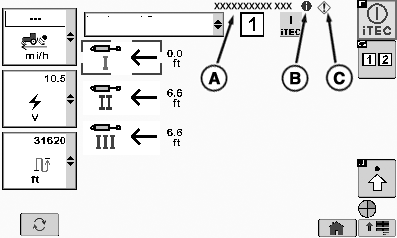
Whenever a sequence execution or a new learning is not possible or is interrupted in the middle, iTEC system informs the operator about the new issue by displaying an Information Alert (B) or Service Alert (C) followed by a short text description (A) in the upper right corner of the displayed page.

RXA0116589-UN-12MAY11
CommandCenter Main Menu → iTEC → iTEC On
RXA0109066-UN-29JUL10
Operation Page
A - Text Description
B - Information Alert
C - Service Alert
Abort Execution
|
Error or Information Description |
Displayed Short Text Description |
Displayed Alert Notification |
Reset Condition |
|---|---|---|---|
|
Abort Execution |
|||
|
The transmission is shifted into Park OR Park information is not received any more. This condition shall only apply to tractors where the controller knows Park status. |
PARK |
Service Alert |
5s after occurrence |
|
Operator presence is FALSE for > 5 seconds and ground speed < 0.5 km/h OR Operator presence information is not received any more. |
OPERATOR PRESENCE |
Service Alert |
5s after occurrence |
|
SCV controller fails to respond to an iTEC command within 5 seconds. |
SCV TIMEOUT |
Service Alert |
5s after occurrence |
|
Hitch controller fails to respond to an iTEC command within 5 seconds. |
HITCH TIMEOUT |
Service Alert |
5s after occurrence |
|
A different sequence switch is actuated. |
SEQ SWITCH |
Service Alert |
5s after occurrence |
|
The sequence switch (see Sequence 1 and 2 Switch or Sequence 3 and 4 Switch) has failed. |
SEQ SWITCH |
Service Alert |
5s after occurrence |
|
The amount of time to execute the sequence takes longer than 60 seconds. |
TIMEOUT |
Service Alert |
5s after occurrence |
|
The Engine Speed drops below 200 rpm or exceeds 3000 rpm. |
ENGINE SPEED |
Service Alert |
5s after occurrence |
|
A function included in the sequence has requested that the entire sequence be aborted (request made through IMS State = 9) due to a major fault which would also indicate a diagnostic trouble code for the specific function. Note: Not currently applicable for any functions. |
FUNCTION REQUEST |
Service Alert |
5s after occurrence |
|
On/Off softkey is pressed |
None |
None |
None |
|
Cancel Learn/Cancel Learn Distance |
|||
|
Operator presence is FALSE for > 5 seconds and ground speed < 0.5 km/h |
OPERATOR PRESENCE |
Service Alert |
5s after occurrence |
|
A different sequence switch is actuated |
SEQ SWITCH |
Service Alert |
5s after occurrence |
|
The sequence switch (see Sequence 1 and 2 Switch or Sequence 3 and 4 Switch) becomes faulted |
SEQ SWITCH |
Service Alert |
Seq. switch is not faulted any more |
|
The Learn Start/Stop softkey is not pressed within 60 seconds of entering Learn mode |
TIMEOUT |
Service Alert |
5s after occurrence |
|
The Engine Speed drops below 200 rpm or exceeds 3000 rpm |
ENGINE SPEED |
Service Alert |
5s after occurrence |
|
A function that is already learned has requested that the entire sequence be canceled (request made through IMS State = 9) due to a major fault which would also indicate a diagnostic trouble code for the specific function. Note: Not currently applicable for any functions |
FUNCTION REQUEST |
Service Alert |
5s after occurrence |
|
20 functions have been learned (Not available with Learn Distance) |
MAX 20 |
Information Alert |
5s after occurrence |
|
The Cancel and Return softkey is pressed |
None |
None |
|
|
Distance starting to be counted when first function is learned exceeds 99.9 m (327 ft.) |
>100 m |
Service Alert |
5s after occurrence |
|
iTEC On |
|||
|
iTEC ON – Passive: The Wheel speed is too low to start execution (shown upon sequence switch press). |
WHEEL SPEED LOW |
Information Alert |
Wheel speed is > 0.5 km/h again |
|
iTEC ON – Execution: The Wheel speed is too low to execute a function in Execution Mode (symbol is shown while wheel speed is < Minimum Execution Wheel speed). |
WHEEL SPEED LOW |
Information Alert |
Wheel speed is > 0.5 km/h again |
|
iTEC ON – Learn Distance: The Wheel speed is too low to execute a function in Learn Distance Mode (symbol is shown while wheel speed is < Minimum Execution Wheel speed). |
WHEEL SPEED LOW |
Information Alert |
Wheel speed is > 0.5 km/h again |
|
ALL pages: The sequence switch (see Sequence 1 and 2 Switch or Sequence 3 and 4 Switch) becomes faulted. |
SEQ SWITCH |
Service Alert |
Seq switch is not faulted any more |
|
iTEC ON – EDIT: The insert function is chosen but already 20 functions in the sequence. |
MAX 20 |
Information Alert |
5s after occurrence |
|
Inhibit iTEC to be turned on |
|||
|
The sequence switch (see Sequence 1 and 2 Switch or Sequence 3 and 4 Switch) becomes faulted. |
SEQ SWITCH |
Service Alert |
Seq. switch is not faulted any more |
|
OURX935,00002F8-19-20120413 |