IVT/AutoPowr Modes And Setting Maximum Speed
RXA0116588-UN-12MAY11
CommandARM Menu Button → Transmission
RXA0111796-UN-28OCT10
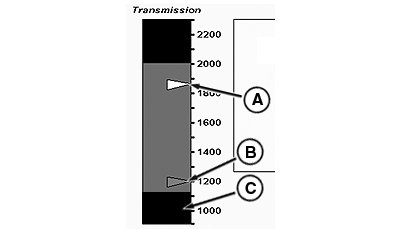
Transmission Page
A - Auto Shift Engine Speed (White Marker)
B - Fuel Economy Minimum Engine Speed (Blue Marker)
C - Full Throttle, Low Idle Speed Limit
IVT/AutoPowr offers 3 modes to get the most fuel efficiency and load control from your tractor:
-
Full Auto
Automatically adjusts Fuel Economy Minimum Engine Speed allowing the tractor to use the most fuel efficient engine speed under light load.
Automatically adjusts Auto Shift Engine Speed Droop allowing the tractor to use its peak power under full load.
-
Custom
Operator can choose the Fuel Economy Minimum Engine Speed, Auto Shift Engine Speed Droop, and Load Anticipation reaction.
-
Manual
Tractor performs as though equipped with a normal transmission and reacts to controls. No Fuel Economy or Load Control functions active in this mode.
|
Full Auto |
Custom |
Manual |
|
|
|
Bar graph in the left region reflects preset operating settings in Full Auto mode. Each of the following, after being preset, will remain unchanged during operation, but the operator will hear engine rpm raise or lower as tractor reacts to changing conditions and lever movements.
- White marker (A) reflects auto shift engine speed.
- Blue marker (B) reflects fuel economy engine speed.
- Black Band full throttle, engine speed limit.
Forward Maximum Speed or Reverse Maximum Speed displays the maximum forward or reverse speed limits. To change the Maximum Speed, select appropriate Maximum Speed box. When Maximum Speed box highlights, select desired speed. Increasing the speeds does not change the dynamic behavior of the tractor. But if the operator changes the Maximum Forward or Reverse speed below current set speed, the set speed would decrease to the max speed and the vehicle speed would decrease.
|
1 (See Downhill Operation in Slippery Conditions
in this section.)
|
OURX935,00004D8-19-20110728 |