Compact Disk (CD) Mode — Premium Radio
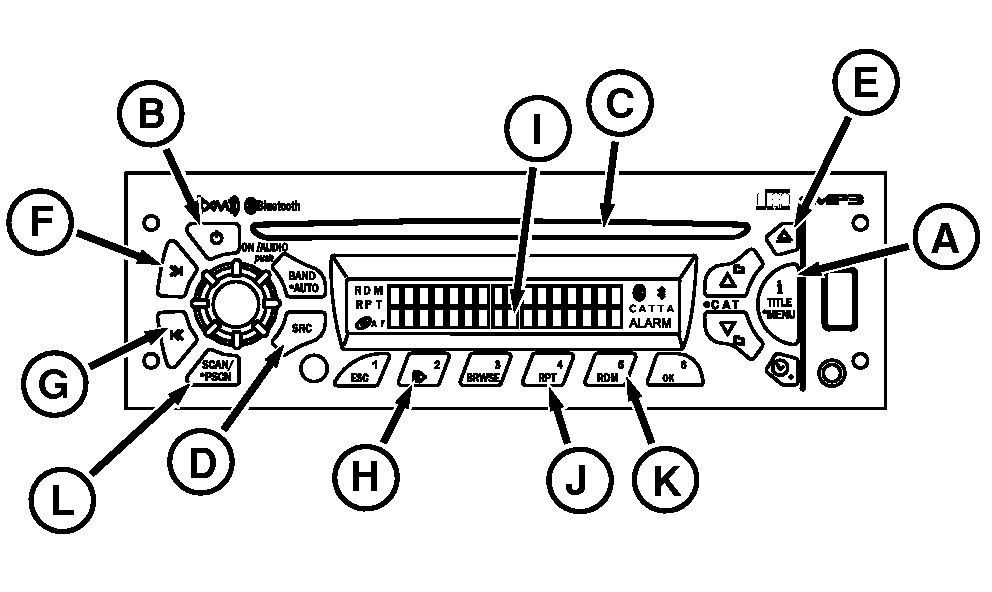
RXA0101846-UN-06MAY09
Radio With CD Player
A - iTitle/Menu
B - Radio ON
C - CD Slot
D - SRC
E - Eject
F - SCAN >>
G - SCAN <<
H - Pause/Play
I - Display
J - Repeat
K - Random
L - SCAN/PSCAN
Playing Compact Disk (CD):-
Turn ignition on and press ON (B) to turn on radio.
-
Insert a disk partway into CD slot (C), label-side up. CD player will automatically pull disk in. Radio displays CD READING, then CD icon followed by track number and elapsed time until first track is played. Then CD begins playing.
NOTE: CD must be loaded into CD player in order to select CD as a source with the SRC button (D). If no CD has been loaded, the CD source will be skipped when the SRC button (D) is pressed. If no available source radio will remain on Rear AUX.
If CD is ejected and not removed within 15 seconds, CD will reload but will not start playing until SRC button is pressed.
-
CD Mode Displays
Press the iTitle/Menu Button (A) to toggle between different displays views:
- Artist Name
- Song Name
- Album Name
NOTE: CD player plays full-size CDs, MP3, and WMA disks.
CD information including disk and track title is shown on display (I) when track starts to play. If there is more information than can appear on display at one time, display will advance every 2 seconds until all information has appeared.
-
Press SRC button (D) to play CD.
If CD is loaded, CD icon remains on until it is ejected. CD READING appears followed by track number and elapsed time.
NOTE: If CD is ejected but not removed within 15 seconds, CD will reload but not play until SRC button is pressed.
-
To remove CD from player, press Eject Button (E).
Button Functions
SEEK >> (F):
- Press for less than 2 seconds to forward to next track.
- Press and hold same button to fast forward, when released CD plays.
SEEK << (G):
- Press button for less than 2 seconds to go to the beginning of current track.
- Press button within first 10 seconds of the track, radio goes to previous track.
- Press and hold button to fast forward, when released CD plays.
- Press button again within first second to go to the beginning of previous track.
- Press and hold to fast reverse. Release button, disk begins playing.
PAUSE/PLAY (H):
- Press button to pause a CD. ”PAUSE” is viewed on radio display (I) and audio is muted.
- Press button again to resume playing.
RPT/RPT Folder (J):
- Press button to repeat current track playing. ”Track Repeat” is displayed.
- Press button again to stop repeating.
- When an MP3 CD is placed in the CD player, ”Folder Repeat” will be enabled.
RDM/RDM Folder (K):
- Press button to activate random track selection. RDM icon on display indicates that tracks on the loaded disk are played randomly.
- Press button again to stop random track selection.
- When an MP3 CD is placed in the CD player, Random Folder will be enabled.
TRACK SCAN :
- Press SCAN/PSCAN (L) for less than 2 seconds to scan tracks on a disk. After playing 8 seconds of current track, radio will go to next track.
- When all tracks on disk have been scanned, SCAN ends and playback begins with first track of SCAN.
- Press SCAN again to deactivate scan.
|
OURX935,0000510-19-20110810 |