Premium Radio CD/MP3/USB/AUX Home Pages on the CommandCenter™
RXA0113203-UN-27JAN11
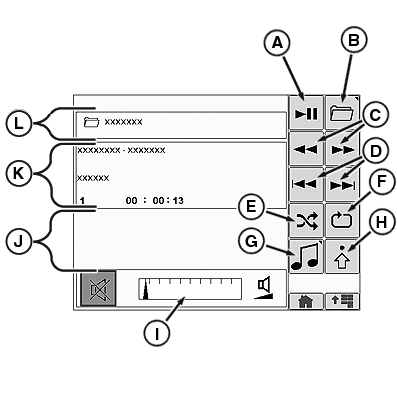
MP3 Home Page Shown
RXA0113216-UN-27JAN11
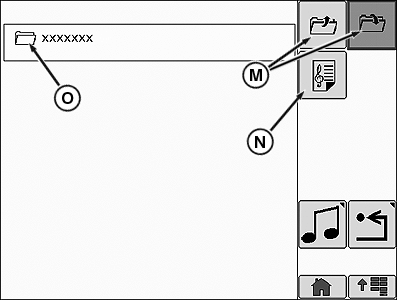
Folder Select Page
A - Play/Pause
B - Folder Select
C - Fast Reverse/Fast Forward
D - Previous Track/Next Track
E - Random Folder/Random All
F - Repeat Track/Repeat Folder/Repeat All
G - Source Select
H - Audio Settings
I - Volume Adjustment
J - iPod® Selection Softkeys (iPod® Only)
K - Display Area 1
L - Folder Name
M - Folder Up/Folder Down
N - Playlist Enable/Disable
O - Folder Name
The Folder Select softkey (B) will bring you to the Folder Select page. The Folder Select softkey (B) and Folder Name (L) are not available when playing a CD or iPod®. The Random softkey (E) will cycle through Random Folder, Random All, and Random Off. The Repeat softkey (F) will cycle through Repeat Track, Repeat Folder, Repeat All, and Repeat Off. The Select Source softkey (G) will give the operator the ability to cycle through radio tuner sources and external sources (see Premium Radio Source Select on the CommandCenter™ in this section).
On the iPod® Home Screen, the iPod® selection softkeys (J) will be available. These softkeys are Previous, Browse, Next, OK, and ESC.
The Display Box (K) will show artist name, album name, song name, track number, and elapsed time. Depending on the home page that is selected, some of these displays may not be available. Folder Name (L) is not available on the CD or iPod® Home Pages.
By choosing the Folder Select softkey (B) you will be able to select what folder to play music from. On the Folder Select page cycle through folders with the Folder Up/Folder Down softkeys (M). The Playlist softkey (N) will enable playlist mode. Playlist mode plays only songs from selected playlists.
|
iPod is a trademark of Apple, Inc. CommandCenter is a trademark of Deere & Company |
OURX935,0000519-19-20110810 |