Setting Service Interval and Resetting Hours Since Service—Performance Monitor Settings

RXA0116494-UN-12MAY11
CommandARM Menu Button → Performance Monitor → Performance Monitor Settings
RXA0106064-UN-20AUG10
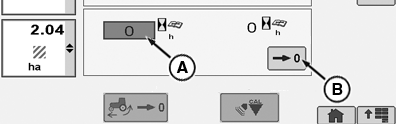
Performance Monitor Settings Page
RXA0120736-UN-21SEP11
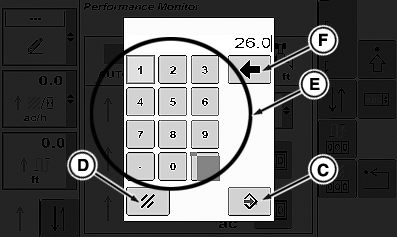
Key Pad
A - Service Alarm Interval Box
B - Reset Hours Since Service Box
C - Enter/Save Button
D - Cancel Button
E - Key Pad
F - Back Space Button
-
Select Menu button.
-
Select Performance Monitor.
-
Select Performance Monitor Settings softkey.
-
At Performance Monitor page go to Service Alarm Interval box (A) and select it.
NOTE: If not changing setting at this time, select cancel button in lower left corner of Service Alert page.
-
Service Alert page appears with a questions and note:
Are you sure you want to reset the total hours since service?
NOTE: If you are using Access Manager and
have multiple displays connected, resetting
the average totals on this display may reset
the average totals on other displays as well.Select Enter/Save button in lower right corner to continue.
NOTE: If an incorrect number is entered on keypad (E), selecting back space button (F) backspaces one space each time button is pushed.
-
Using key pad enter number of hours until next desired service alarm notification.
-
Select Enter/Save button (C) to store new number.
OR
Select cancel button (D) to escape.
-
Select Reset Hours Since Service Box (B) and make appropriate change using keypad as described for setting service interval.
|
OURX935,00005E7-19-20110928 |