Operating Rear PTO
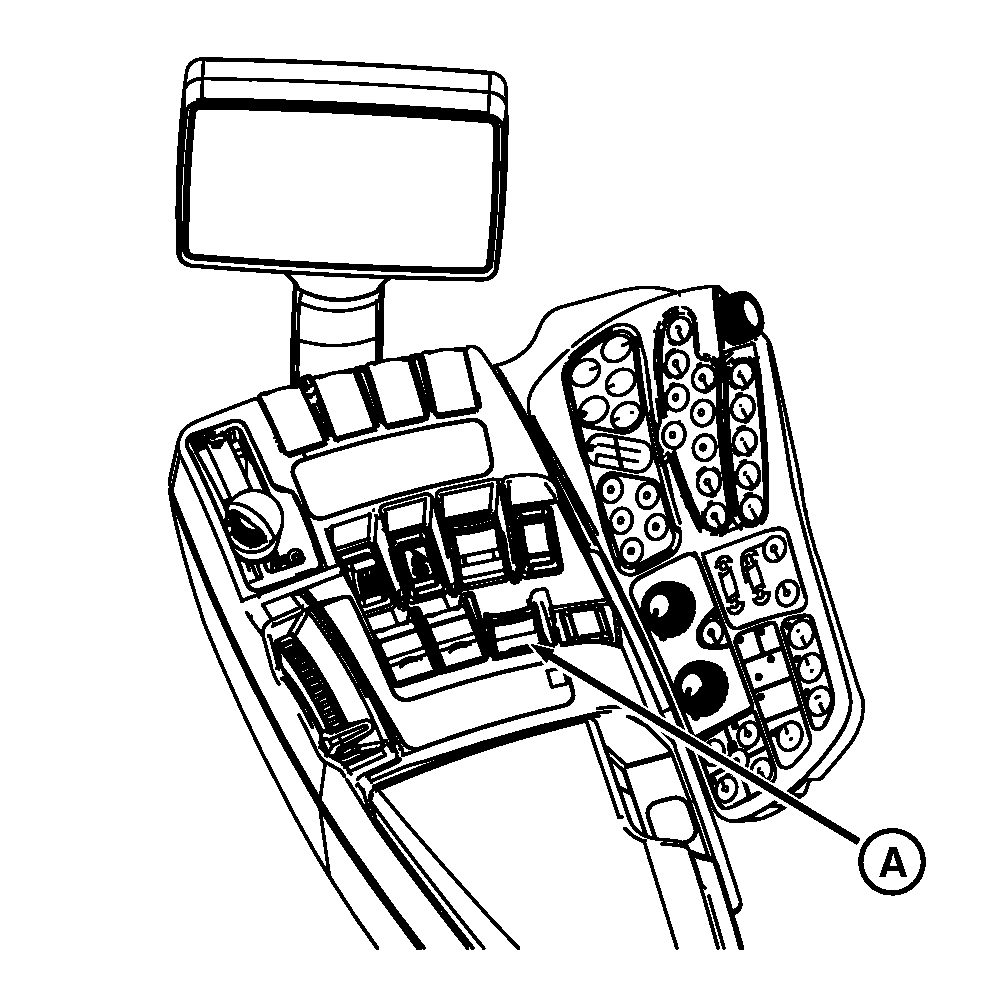
RXA0098433-UN-07JUL08
Rear PTO
A - Rear PTO Switch
 CAUTION: Avoid personal injury. Stop engine and allow PTO driveline
to stop before adjusting, connecting, or cleaning PTO-driven equipment.
CAUTION: Avoid personal injury. Stop engine and allow PTO driveline
to stop before adjusting, connecting, or cleaning PTO-driven equipment.
Always disengage the PTO when not in use.
PTO can be engaged or disengaged without operating the clutch.
NOTE: Service Alert indicator light will flash, a message appears on the CommandCenter™ display and an audible warning signal sounds if operator leaves seat with PTO engaged. PTO does not disengage when operator is off the seat.
Push down and forward on PTO switch (A) to engage PTO clutch. PTO indicator on corner post monitor will light.
IMPORTANT: If PTO disengages during start up in cold-weather operation, wait 5 minutes before re-engaging PTO to avoid damage.
Tractor software will NOT allow operator to re-engage PTO immediately if engine rpms drop excessively due to heavy load at PTO startup. Diagnostic trouble code will display on CommadCenter. There will be a 10—15 second delay before operator can re-engage PTO. This delay allows clutch to cool before it is re-engaged.
Pull back PTO switch to disengage clutch and PTO brake will engage automatically.
NOTE: If engine is stopped and then restarted while PTO is running, PTO will not operate. Disengage PTO control switch and then engage the PTO again.
For tractor equipped with Independent Link Suspension, suspension will automatically level when tractor is stationary with PTO switch ON.
|
CommandCenter is a trademark of Deere & Company |
OURX935,000066B-19-20090130 |