Changing World Tuner Settings—Deluxe Radio
-
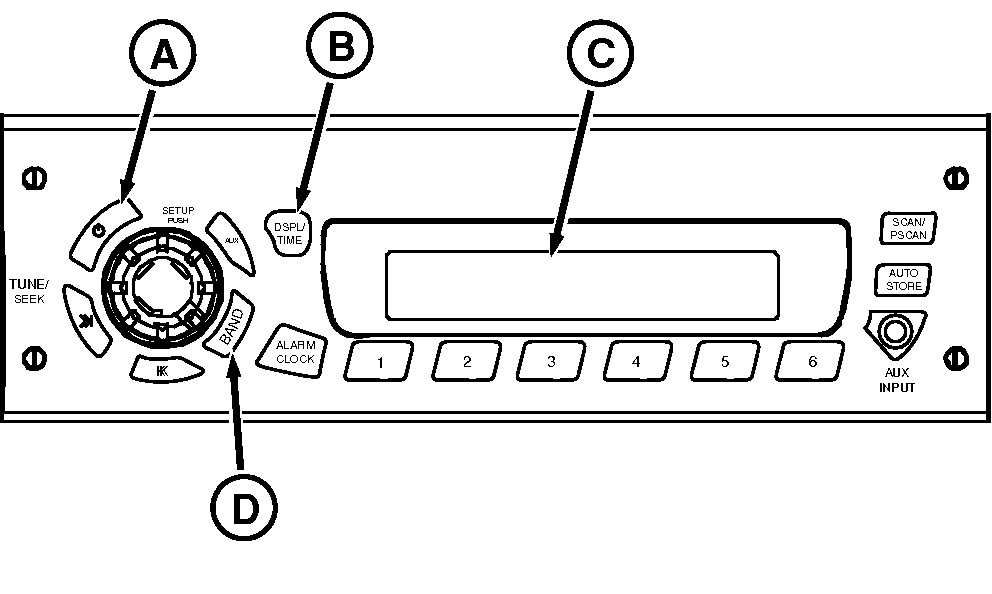
Turn tractor key switch on and push radio Power button (A) to turn radio off.
RXA0100930-UN-06MAR09Deluxe Radio
A - Power Button
B - DISP/TIME Button
C - Display
D - Band Button
-
Push and hold DISP/Time Button (B) for 2 or 3 seconds until time on radio display (C) flashes.
-
Promptly push BAND Button (D) to display regions for frequency selection.
-
Each time BAND Button is pushed, radio display cycles to next region.
-
When desired region is displayed for correct frequency band, press and hold BAND Button until display changes and the time is displayed, then release BAND Button.
|
OURX935,0000AE7-19-20090904 |