Configurable Lights
 CAUTION: Avoid injury caused by accidental collision with another
vehicle. Always comply with traffic regulations when driving tractor
on a road. Dim Road Lights to low-beam for oncoming vehicles. Avoid
using Flood Lights which could blind or confuse other drivers.
CAUTION: Avoid injury caused by accidental collision with another
vehicle. Always comply with traffic regulations when driving tractor
on a road. Dim Road Lights to low-beam for oncoming vehicles. Avoid
using Flood Lights which could blind or confuse other drivers.
RXA0107022-UN-14JUN13
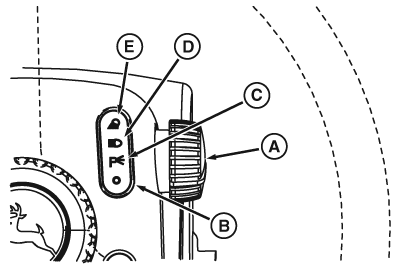
Steering Column Light Switch
RXA0107238-UN-26AUG10
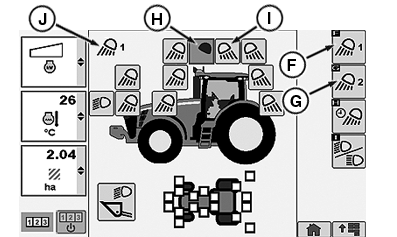
CommandCenter™ Lights Page
RXA0106384-UN-26MAR10
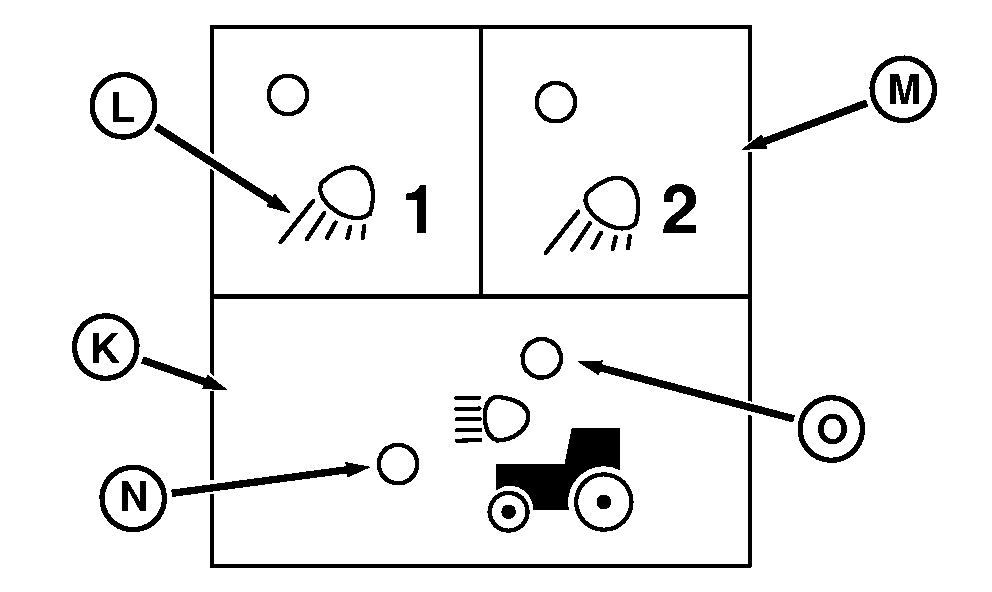
CommandArmCommandARM™ Controls Lights Buttons
A - Selector Knob
B - OFF
C - Parking Lights
D - Road Lights
E - Flood Lights
F - Flood Lights 1 Softkey
G - Flood Lights 2 Softkey
H - Light Configured OFF
I - Light Configured ON
J - Flood Lights Position Indicator
K - Road Lights
L - Flood Lights 1
M - Flood Lights 2
N - Road Light Indicator
O - Loader Light Indicator
Selector knob (A) is in OFF position (B). Turn Selector knob forward to Park Lights (C) to turn on brake lights. Turn Selector knob forward to Road Lights (D) to turn on either high beam or low beam Road Lights. Turn Selector knob forward to Flood Lights (E) to turn on all Floods Lights previously configured at CommandCenter Light page.
When the steering column Selector knob is turned to Flood Lights, selecting Flood Lights 1 softkey (F) allows operator to configure which Flood Lights are ON or OFF for that application. Operator can toggle between Flood Lights 1 or Flood Lights 2 simply by pressing Flood Lights 1 button (L) or Flood Lights 2 button (M) respectively. Selecting Flood Lights 2 softkey (G) displays second option of Flood Lights. Verify Flood Lights configuration displayed by looking at Flood Lights Position Indicator (J) in the upper left corner of the CommandCenter Light page.
Light display shows for 10 seconds whenever light switch is changed to a programmable setting. If no changes are made, display returns to last screen shown. Light indicators change from black (H) to white (I) when configured ON.
CommandArm Controls indictor lights (N or O) indicate the status of Road Lights or Loader Lights if equipped.
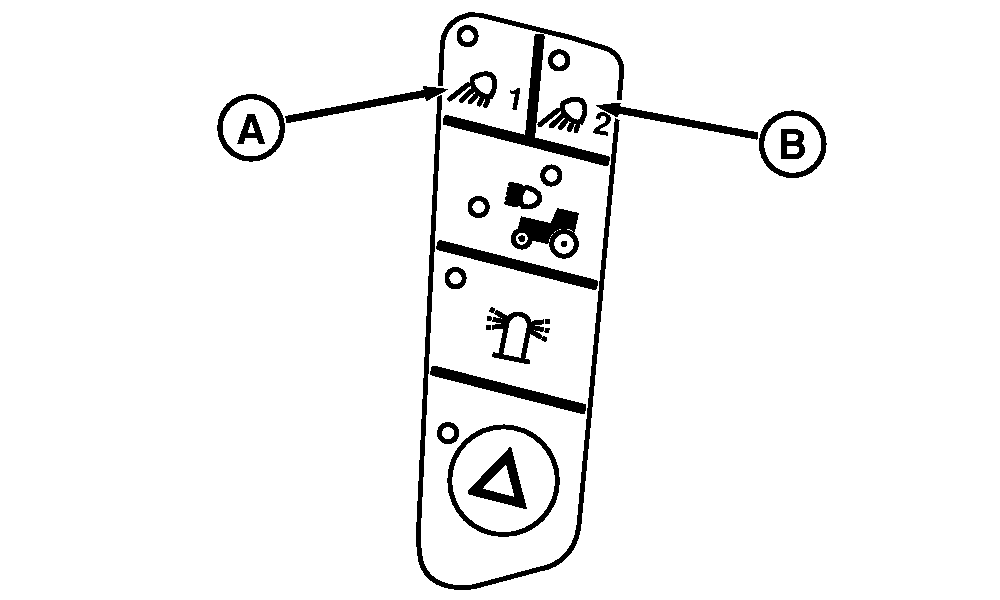
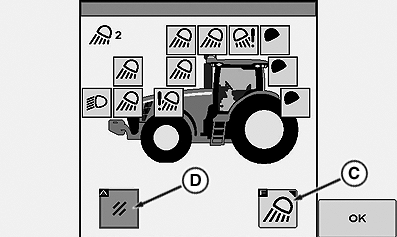
While operating in the field pressing Flood Lights 1 (A) or Flood Lights 2 (B) will display a quick view (3 seconds) of the appropriate lights configured ON before defaulting back to previous page displayed on CommandCenter .
RXA0103507-UN-15JUN09
CommandArm Controls Field Lights Buttons
RXA0106416-UN-26AUG10
Lighting Quick Look
A - Flood Lights 1
B - Flood Lights 2
C - Lights
D - Cancel
Selecting Lights (C) displays lights page on CommandCenter allowing light to be configured. Selecting cancel returns operator previous page.|
CommandCenter is a trademark of Deere & Company CommandARM is a trademark of Deere & Company |
OURX935,0001098-19-20100505 |