Setting Alarm Volume
-

RXA0116493-UN-12MAY11CommandARM Menu Button
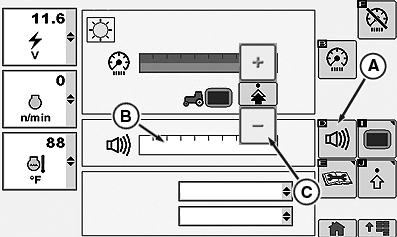
RXA0117796-UN-14JUN11Display Main Page
A - Volume Softkey
B - Adjust Volume Bar graph
C - Increase/Decrease Value Buttons
Select Menu button. -
Select Display.
-
Select Volume softkey (A) to adjust volume.
-
Highlight volume bar graph (B), then make adjustment with increase/decrease value buttons (C).
|
RD47322,00005E9-19-20120705 |