Front Hitch—Adjust Raise And Lower Flow Rates
RXA0117610-UN-10JUN11
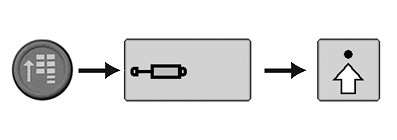
CommandARM Menu Button → SCV Softkey→ Advanced Settings Softkey
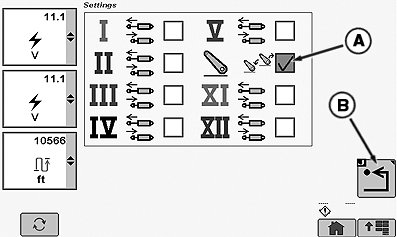
RXA0125210-UN-23FEB12
Front Hitch Icon
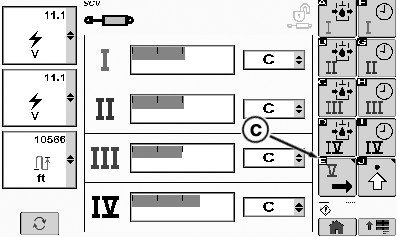
RXA0125244-UN-23FEB12
Next Page
A - Front Hitch Differential Flow Box
B - Return Main Page
C - Next Page
NOTE: The flow rates for the front hitch are not selectable using the softkeys on the right side of the display.
The softkeys are only to set the upper and lower position limits for hitches with position sensors.
The front hitch settings are the same as for the SCVs.
The front hitch can also have different flow settings for hitch raise and lower function using Independent Mode settings. See Independent Mode in Selective Control Valve Section 61.
Hitch raise and lower speeds may be adjusted by selection of available flow rates. Reduce flow rate to slow raise or drop speed.
Once desired adjustments have been made, pressing detent of hitch control lever will operate hitch between upper and lower limits selected. Hitch system will control oil flow to slow hitch as it nears desired position.
-
To set different front hitch raise and lower flow rates, select CommandARM Menu button, SCV softkey, then Advanced Settings softkey “J”.
-
Check front hitch selectable flow rate box (A) icon in SCV list.
-
Select softkey “J” (B) to return to SCV main page.
-
Select softkey “E” (C) for next screen to adjust flow rates.
-
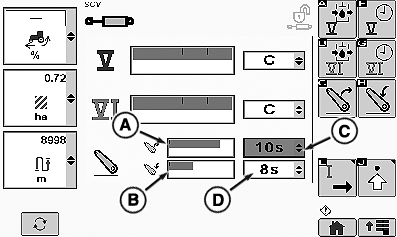
RXA0125272-UN-27FEB12Hitch Flow Rate and Time
A - Hitch Raise Flow Rate
B - Hitch Lower Flow Rate
C - Raise Detent Time
D - Lower Detent Time
Adjust hitch raise flow rate (A) or hitch lower flow rate (B) by highlighting respective flow box and changing flow value. -
Select hitch desired raise (C) and lower (D) time frames and desired time will appear in drop down box.
-
Return to main menu to exit screen.
|
RW29387,000018E-19-20120227 |