Premium Radio Settings on the CommandCenter™
RXA0118820-UN-21JUL11
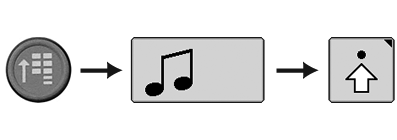
CommandARM Menu Button → Radio Softkey → Advanced Settings Softkey
RXA0118806-UN-21JUL11
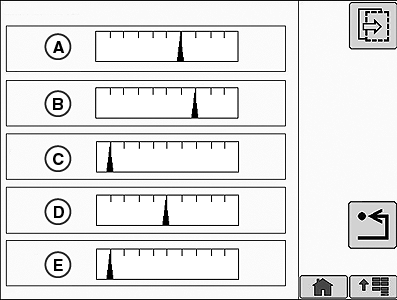
Radio Settings Page 1
RXA0118807-UN-21JUL11
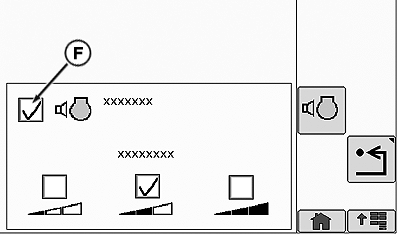
Radio Settings Page 2 (Without RDS)
RXA0126909-UN-19JUN12
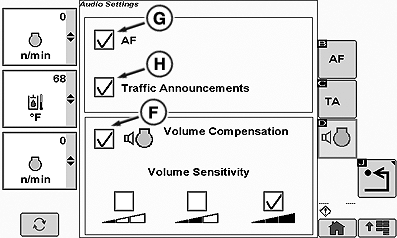
Radio Settings Page 2 (With RDS)
A - Bass
B - Treble
C - Middle
D - Balance
E - Fade
F - Volume Compensation
G - AF (Alternate Frequency)
H - Traffic Announcements (TA)
- Select Menu button.
- Select Radio softkey.
- Select Advanced Settings softkey.
Operator can change Bass (A), Treble (B), Middle (C), Balance (D), and Fade (E) on Audio Settings page 1. Volume compensation is located on Audio Settings page 2. Volume compensation automatically adjusts the radio's volume based on external noise. To enable/disable volume compensation select the Volume Compensation check box (F). Volume sensitivity can be adjusted to low, medium, or high.
Radio Data System (RDS)
If Premium radio is set to “Europe” standard (see Changing World Tuner Setting—Premium Radio in this section) the Radio Data System (RDS) becomes available. RDS allows display of radio station selected, artist and song information. RDS also provides additional options on Radio Settings Page 2. To enable/disable these features, select appropriate check box using soft keys. Options available are:
-
AF (Alternative Frequency) (G) —
Automatically retunes radio to different frequency providing same
station content when first station’s signal becomes too weak.
NOTE: AF (Alternate Frequency) must be enabled to select Traffic
Announcements (TA) function.
- Traffic Announcements (TA) (H) — Stops or pauses CD play or retunes currently selected station to receive a traffic bulletin. Radio volume will automatically increase for traffic bulletin.
|
OURX935,0000505-19-20120620 |