Setting Clock and Alarm—Deluxe Radio
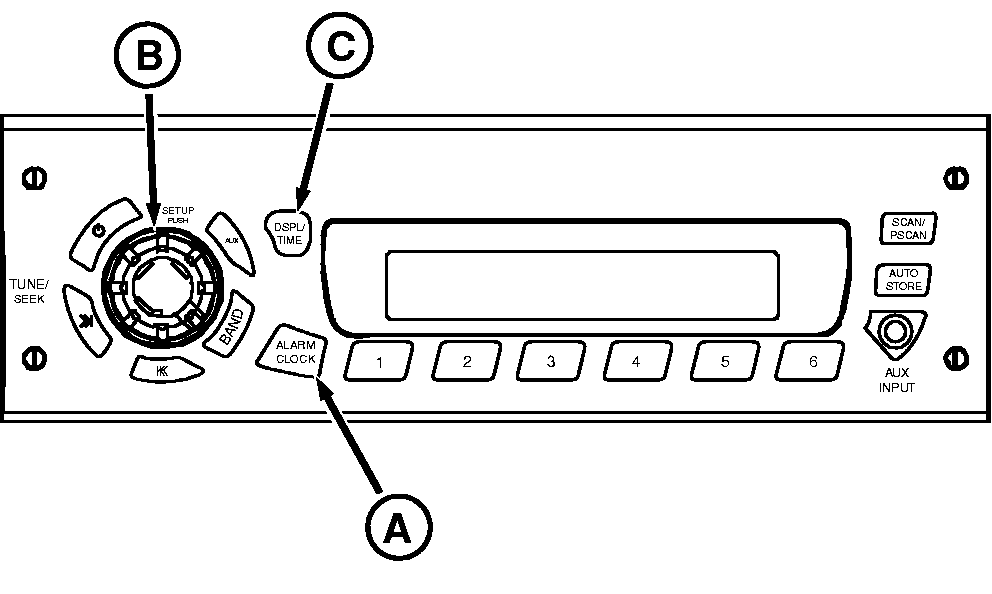
RXA0098831-UN-05AUG08
Radio
A - ALARM CLOCK
B - SETUP
C - DSP/TM SET
NOTE: If no adjustments are made for 5 seconds during alarm set process, alarm clock setup will be cancelled and radio will return to normal operation, keeping whatever setting changes have been made.
Setting Clock
- Switch ignition to ON position.
- Press and hold DSPL/TM SET (C) button until ”hours” and ”minutes” digits flash and you hear a beep.
- Press DSPL/TM SET button again until ”hours” digits flash.
- Rotate SETUP (B) knob to change the hour. Rotate knob clockwise to increase and counterclockwise to decrease the hour.
- Press DSPL/TM SET button again until ”minutes” digits flash.
- Rotate SETUP knob to change minutes. Rotate knob clockwise to increase and counterclockwise to decrease minutes.
- Press DSPL/TM SET button again to complete time set procedure. Display will return to default display.
Change display clock function to 12 or 24 hour mode
The 12 hour mode distinguishes between AM and PM and 24 hour mode operates as military time.
- To change mode press and hold the "DSPL/TM SET" button until clock display digits begin to flash (approximately 2 seconds).
- To change from 12 to 24 hour time format, press and release the number "5" preset station button. If pressed a second time, it will toggle back from 24 to 12 hour mode.
- Wait 5 seconds without pushing any radio buttons for clock to return to regular operation.
Setting The Alarm
- With radio on, press and hold ALARM CLOCK (A) button until ”ALARM” icon and SET are displayed. Hour digits for alarm time will begin to flash.
- Rotate SETUP (B) knob to change the hour. Rotate knob clockwise to increase and counterclockwise to decrease hour.
- Press ALARM CLOCK button again until minutes digits flash.
- Rotate SETUP knob to change minutes. Rotate knob clockwise to increase and counterclockwise to decrease minutes.
- Press ALARM CLOCK again until SET TONE appears on display.
- Press ALARM button again until VOL appears on display. Press button again and you will hear alarm tone. Rotate SETUP knob clockwise to increase and counterclockwise to decrease volume.
- Press ALARM CLOCK button again to finish and return display to normal operation. Alarm icon will appear on display to indicate that alarm is active.
|
OURX935,0000AE6-19-20090902 |