Operating 18-Speed Powershift Transmission

RXA0103941-UN-24JUL09
Transmission Short Cut Button
RXA0111349-UN-11OCT10
PST Page
RXA0115282-UN-09MAY11
Efficiency Manager 1 and 2 Switch
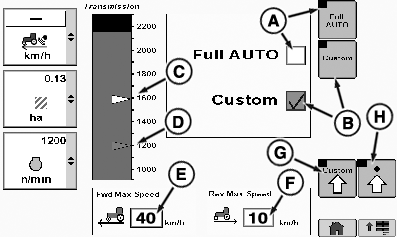
A - Full AUTO
B - Custom
C - Auto Shift RPM
D - ECO RPM
E - Forward Maximum Speed
F - Reverse Maximum Speed
G - Custom Transmission Settings
H - Advanced Transmission Settings
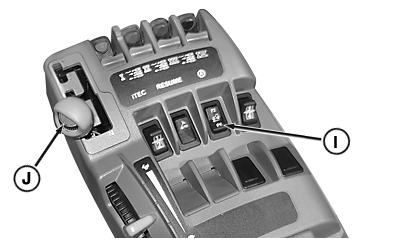
I - Efficiency Manager Switch
J - Set Speed Adjusting Wheel
Efficiency Manager™ shifts transmission to maintain set speed.- Efficiency Manager™ is not to be used during scraper loading.
- Efficiency Manager™ will not operate in reverse gear, but will remain enabled.
- Efficiency Manager™ allows for two shift modes, Custom and Full Auto.
Full Auto (A) will use default settings.
Custom (B) will use operator's custom settings.
Enabling Efficiency Manager™
- To enable Efficiency Manager™, select the Efficiency Manager™ switch 1 or 2 (I).
- Startup gear will then be engaged unless set speed is below startup gear rpm range.
- Selecting either switch will automatically enable the corresponding set speed, even if Efficiency Manager™ is already enabled. However, selecting the same Efficiency Manager™ switch again will disable Efficiency Manager™.
When using Efficiency Manager™ Transmission
- Efficiency Manager™ indicator will light.
- Set throttle to full engine rpm. Tractor will reach set speed only if engine throttle is set to full rpm.
- Efficiency Manager™ commands up/down shifts and engine rpm to maintain wheel speed.
- Shift decision is based on load conditions, throttle command, and operator settings.
- Set speed is adjusted using set speed adjuster (J) on shift lever.
- If engine speed falls below 700, transmission will shift into neutral to prevent engine stall.
- Depressing clutch pedal suspends Efficiency Manager™ but will not cancel Efficiency Manager™ function. Efficiency Manager™ will resume in the startup gear when clutch pedal is released. To adjust startup gear, select Advanced Transmission Settings page softkey (H).
- Shifting into reverse suspends Efficiency Manager™ but will not cancel Efficiency Manager™ function. Efficiency Manager™ will resume in the startup gear when shifted into forward.
NOTE: Efficiency Manager™ set speeds can be programmed into iTEC™, but not Efficiency Manager™ on and off.
Disabling Efficiency Manager™ Transmission
Efficiency Manager™ is canceled when operator shifts transmission to another gear or the Efficiency Manager™ switch is selected again. Pressing Efficiency Manager™ button restores control of shifting to Efficiency Manager™.
IMPORTANT: When disabling Efficiency Manager™, tractor rpm will change to match throttle position, possibly resulting in tractor acceleration.
Custom Transmission Settings
NOTE: All settings pertaining to this page are only applicable when Efficiency Manager™ is in Custom mode.

RXA0106343-UN-12MAR10
Custom Transmission Settings Page
RXA0111354-UN-11OCT10
Custom Transmission Settings Page
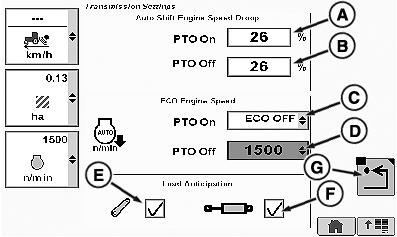
A - Auto Shift Engine Speed Droop PTO ON
B - Auto Shift Engine Speed Droop PTO OFF
C - ECO Engine Speed PTO On
D - ECO Engine Speed PTO Off
E - Load Anticipation (Hitch)
F - Load Anticipation (SCV)
G - Return
The Auto Shift Engine Speed Droop sets the amount of engine speed drop (under full load) that is allowed before the Custom mode will automatically downshift. A lower percent means that less drop is allowed before a downshift.
Under light loads, fuel can be saved by shifting up and throttling back. Full Auto mode does this automatically. Under light load, the ECO Engine Speed is the lowest engine speed the system will shift up to in order to save fuel. Lowest allowed ECO Engine Speed is 1500 rpm.
The Load Anticipation feature allows the Efficiency Manager™ to predict loads due to activation of hitch or SCV movement. This section determines whether the transmission will downshift to get the engine speed above desired minimum rpm when either the hitch or SCV are used. If the hitch is dropped or raised, the system will downshift if the engine speed drops below 1500 rpm. If the SCV is set to extend or retract above a 25% flow rate, the transmission will downshift automatically if predicted rpm is below desired minimum. An SCV that is set to continuous flow will also cause the transmission to downshift automatically if predicted rpm is below desired minimum. Load Anticipation is enabled in the "Full Auto" mode selected on the Transmission page by default. In the "Custom" mode, load anticipation for the hitch is enabled when the hitch check box (E) is checked. In the "Custom" mode, load anticipation for SCVs is enabled when the SCV check box (F) is checked.
ECO Engine Speed feature may raise minimum engine speed when load anticipation is enabled and either the hitch or SCV is placing a heavy load on the engine, or an SCV is in continuous flow.
-
Select Transmission icon.
-
Select Custom soft key.
-
NOTE: Auto Shift Engine Speed Droop PTO ON can be set from 20
% —26 % or PTO OFF can be set from 20% — 26 %.
To Set Auto Shift Engine Speed Droop, PTO ON: - Select Shift Engine Speed Droop drop down box PTO On (A). PTO On box hi-lights.
-
Adjust Set percentage value to desired value.
To Set Auto Shift Engine Speed Droop, PTO OFF:
- Select Auto Shift Engine Speed Droop drop down box PTO OFF (B). PTO OFF box will be highlighted.
-
Adjust Set percentage value to desired value.
To Set ECO Engine Speed rpm, PTO ON:
-
Select ECO Engine Speed PTO ON box (C). When drop-down box appears,
select desired rpm from options listed.
To Set ECO Engine Speed, PTO OFF:
-
Select ECO Engine Speed PTO OFF box (D). When drop-down box
appears, select desired rpm from options listed.
To Turn On Load Anticipation:
- Select either Hitch check box (E) or SCV check box (F) . When SCV check box is checked, engine speed is boosted, if needed, at each occurrence SCV is extended or retracted. When Hitch check box is checked, engine speed is boosted, if needed, at each occurrence hitch is raised or lowered.
- To return to previous page, select Return soft Key (G).
|
Efficiency Manager is a trademark of Deere & Company iTEC is a trademark of Deere & Company |
OURX985,000000F-19-20110406 |