Manually Programming A Sequence While Stationary
-
NOTE: If implement name has not been loaded or requires editing, refer to Entering Or Editing Equipment Name in this section of the Operator's Manual.
Select iTEC.
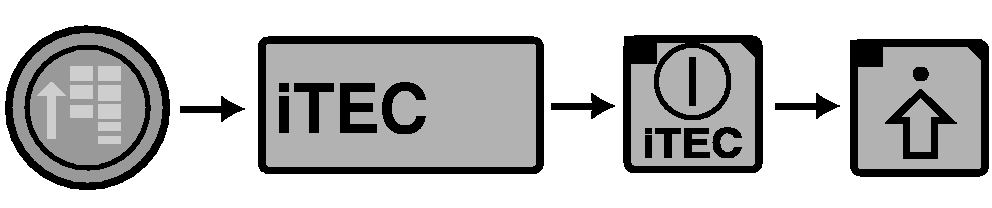
RXA0110773-UN-09SEP10iTEC
RXA0110311-UN-22SEP10Edit Page

RXA0109992-UN-20AUG10Insert Function
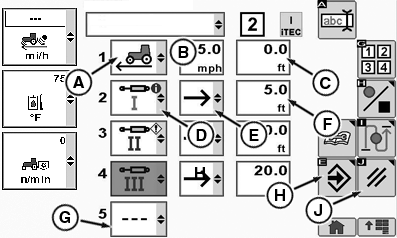
A - First Function
B - First Function Operation Box
C - First Function Input Distance Box
D - Second Function
E - Second Function Operation
F - Second Function Input Distance box
G - Delete Function
H - Save Enter Softkey
I - Insert Function
J - Cancel Softkey
-
Select iTEC On/Off softkey.
-
Select Advanced Settings softkey.
NOTE: For a complete list of functions available, see Description And Display in this section of Operators Manual. To delete a function, select Delete Function (G). To insert a function in a sequence, select Insert Function (I).
-
Select first function (A) drop down box.
-
Select function, Set Speed for example.
-
Select Operation drop down box (B).
-
Select Edit Distance input box (C).
-
Select second Edit Function drop down box (D) and select function, SCV I for example.
-
Select Operation drop down box (E).
-
Select Edit Distance input box (F).
-
Continue to load functions, operations and distances, up to 20 functions.
-
When sequence is complete, select Save/Enter softkey (H) to save program.
NOTE: To cancel a sequence, select Cancel softkey (J).
After selecting Save/Enter softkey, sequence is sorted by ascending distances, i.e. in the graphic to the right, the first function with a distance of 0.0 ft. will be listed as the first function. The depicted Set Speed function beginning at 0.0 ft. will be the first function on the page.
|
OURX985,000008B-19-20101101 |