Executing Programmed Sequence
NOTE: The tractor can not be in park while executing a sequence. Tractor drive lever must be in a forward position when executing set speeds or gears. Tractor must be driven at a speed of at least 0.5 km/h (0.31 mph).
iTEC indicator switch needs to be switched in the ON position. iTEC cannot physically “turn on” relevant switches. Before sequences are performed that include selective control valve functions, the relevant levers must be in the neutral position.
-
Select iTEC.

RXA0108933-UN-29JUL10iTEC
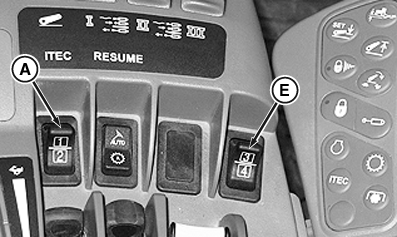
RXA0109991-UN-20AUG10CommandArm
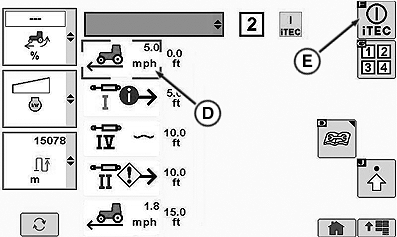
RXA0110315-UN-11NOV10iTEC Operation Page
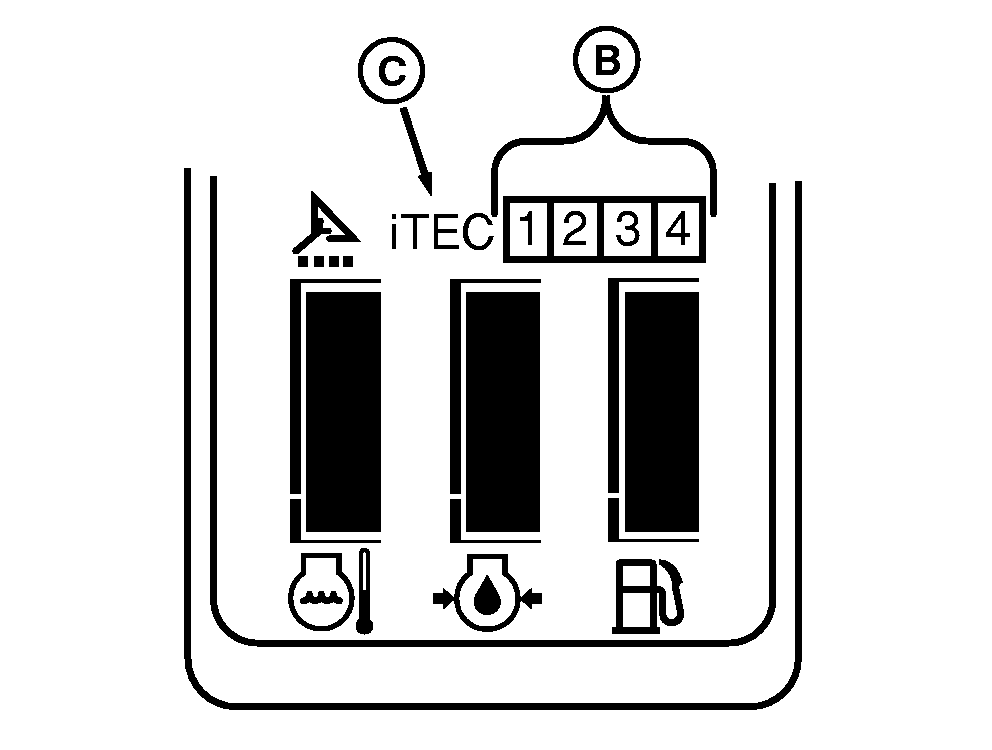
RXA0109994-UN-24AUG10Corner Post Display
A - Sequence Switch (1 and 2)
B - Sequence Number
C - iTEC
D - iTEC On/Off Softkey
E - Sequence Switch (3 and 4)
-
Select iTEC ON/OFF softkey.
-
Select CommandARM™ sequence switch (A) or (E).
-
On the corner post display, the executing sequence number (B) and iTEC are both illuminated.
-
On the iTEC Operation Page the iTEC status indicator (D) does change and the frame is showing the function that gets executed next.
-
After a sequence has ended, the display is changing to the ‘next’ sequence. A manual intervention can be made in a running sequence at any time.
NOTE: To abort a sequence immediately, change to a different sequence by selecting switch, or select – iTEC ON/OFF Softkey (E) to turn off sequence.
Manual interaction of the function during sequence execution will cause that function not to execute. The error/service icon will indicate this on the function.
If an abort occurs previously, commanded functions may be canceled. An example would be SCV canceled if operator hasn't manually controlled those functions during execution.
|
CommandARM is a trademark of Deere & Company |
OURX985,000008E-19-20101101 |