Powershift Transmission Calibration
CHECK OIL LEVEL AND WARM-UP PROCEDURE BEFORE CALIBRATION
-
NOTE:
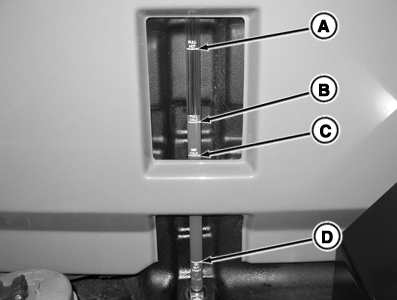
RXA0117336-UN-18MAY11Hydraulic Oil Reservoir
A - “Full Hot” Mark
B - “Full Cold” Mark
C - “Min Cold” Mark
D - “Do Not Start” Mark
The powershift transmission only needs to be recalibrated if transmission shift characteristics change after transmission oil and filter change.If shift characteristics change, use following procedure to calibrate the transmission.
Do not perform oil check soon after transporting tractor in 15th or a higher gear.
IMPORTANT: Poor shift quality and/or transmission damage may occur if the HY-GARD or JDM J20C specifications are not followed. To ensure proper shift quality, an oil meeting HY-GARD or JDM J20C specifications must be used.
Do not operate tractor if oil is below mark (C) in sight gauge with engine off.
Start tractor engine and warm hydraulic oil to above 35°C (95°F). Use CommandCenter display to check hydraulic oil temperature. (See CommandCenter Section).
-
After oil is at desired temperature, drive to a level surface.
-
Shift transmission lever to PARK. Set engine speed at 1800 rpm and run for 5 minutes.
-
NOTE: DO NOT step on brake pedal during this segment of the procedure to avoid additional oil flow to the axles and resulting in an inaccurate oil level check.
Reduce engine speed to slow idle, shut engine OFF, and wait 5 minutes for oil to stabilize.
-
Check oil level sight gauge in hydraulic oil reservoir. Oil level should be between “Warm” Full (A) and “Cold” Add (B) marks.
WHEN TO CALIBRATE
- If a clutch solenoid or valve is replaced.
- If shift quality has degraded.
- When the transmission filter is replaced.
- When the transmission hydraulic fluid is changed.
- When the PTP is replaced.
- When the transmission is pulled for maintenance or replaced for any reason.
Transmission calibration is recommended for any of the following reasons:
Automatic Warm-up
Before beginning the calibration process, the PTP checks the transmission oil temperature. If the temperature is 50° C (122°F) or below, the PTP will automatically exercise the transmission clutches to warm the transmission. During this warm-up period, the Command Center Display will display “CLD” When the temperature reaches the proper level, calibration will begin, with the Command Center Display displaying the calibration stage indication messages.
Manual Warm-up for Calibration
If the transmission oil temperature is below 10°C (50°F), the PTP will not perform automatic warm-up. “OIL” will appear on the Command Center Display, PTP diagnostic mode will have to be exited, and the transmission oil temperature will have to be manually warmed to at least 10°C (50°F) before the automatic warm-up feature can be utilized to warm the transmission oil above 50° C (122°F) at which point calibration will start. Warming the transmission oil can be accomplished by using a SCV hose flow loop or driving the tractor. The amount of time required to increase the temperature will vary depending on how cold the sump is, the weather conditions, etc. Reducing transmission fluid cooling efficiency by restricting airflow through the cooler can shorten the warm-up time.
 CAUTION: Perform transmission calibration with the tractor in
an open, outdoor area on flat ground.
CAUTION: Perform transmission calibration with the tractor in
an open, outdoor area on flat ground.
Verify the park brake is functioning properly. Do not permit others near the tractor during the procedure.
While calibrating, remain in the operator's seat.
Depending on starting sump temperature, calibration typically takes 12-15 minutes.
-
IMPORTANT: Serious damage to the PST may result if transmission sump is very low or dry.
RXA0098156-UN-07NOV08
RXA0099746-UN-14JUL10Message Center
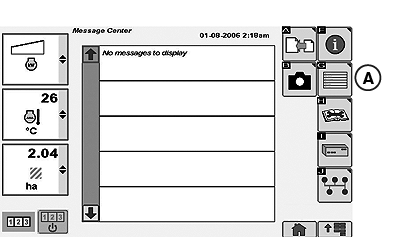
RXA0111868-UN-11NOV10Message Center Page
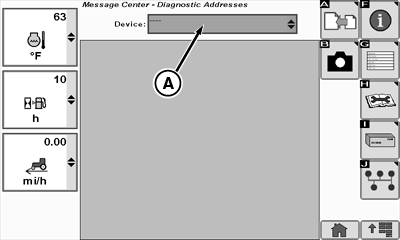
A - Diagnostic Addresses
Be sure the hydraulic/transmission/axle oil is at the proper level. -
Place shift lever in PARK position.
-
Make sure Efficiency Manager™ is disabled.
-
Press the Menu button and select Message Center.
-
Select Diagnostic Addresses softkey (A).
-
RXA0111870-UN-11NOV10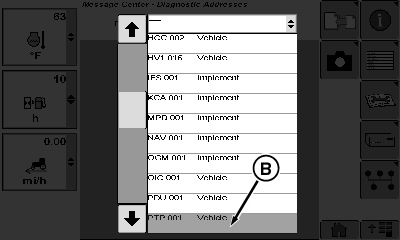
RXA0111873-UN-11NOV10A - Device Drop Down Menu
B - PTP.001
Select PTP.001 (B) in device drop down menu (A). Wait for hourglass to clear. -
Select Address 025 in drop down menu wait for hourglass to clear.
YZ9641-UN-11AUG10Leave shift lever in P.
CAUTION: Placing shift lever in F or R at this point will result
in tractor movement. -
PTP should appear on the Secondary Display Unit display. Select the arrow icon.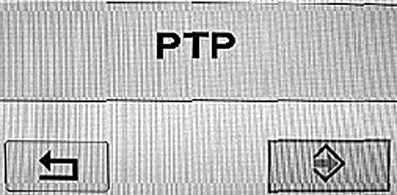
RXA0111875-UN-11NOV10IMPORTANT: Operator presence must be detected in this step to proceed!
-
CAL should appear on the Secondary Display Unit display.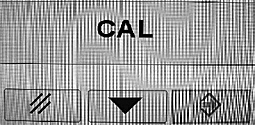
YZ9643-UN-11AUG10NOTE: This indicates transmission calibration is ready to begin.
-
Adjust throttle to set the engine at 1600 rpm.
-
Move the shift lever to the N position. P should still be displayed on the corner post PDU display.
IMPORTANT: If "P" is NOT displayed on the corner post, lever movement to F or R positions will result in tractor movement. Do not proceed. Return to Step 2.
-
Move the shift lever to the F or R position to start calibration.
-
If CLD appears, this indicates that the transmission sump temp is less than 50° C . The calibration process will continue in order to warm the sump and automatically begin calibration when the sump is warm enough. If the sump temperature (available in PTP Address 33) is more than a few degrees below 50° C, it may be faster to warm the sump by shuttle-shifting the tractor prior to attempting a calibration.
-
IMPORTANT:
Once calibration begins, do not manually change the throttle, move the shift lever, or depress the clutch pedal. Calibration will be aborted.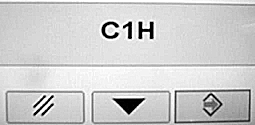
YZ9647-UN-11AUG10When C1H appears, it indicates that calibration has started.
-
C1H indicates “Clutch 1 Hold calibration" is in progress. Hold stages for clutches 2, R, A, B, C, L, M, and H then follow in order. When all nine hold stages are complete, C1F and C2F, etc. will be then be displayed as the fill time calibrations for each clutch are performed in the same order.
-
When END appears, calibration is complete.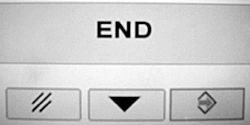
YZ9648-UN-11AUG10NOTE: If calibration aborts due to a fault (i.e. no engine or transmission activity is heard for a period of 30 seconds), a three-letter fault message will be displayed, and it should be noted and reported. Another cal attempt may be made if so desired.
EXITING CALIBRATION
Exit calibration using the following steps to avoid setting any unnecessary DTC’s:
-
Throttle down.
-
Move shift lever from F or R to P.
-
The Secondary Display Unit display should change to CAL.
-
While seated, push the arrow key.
-
The Secondary Display Unit display should change from CAL to PTP.
-
Now the CSM dial can be turned to change the PTP address without generating any PTP DTCs.
-
Turn the CSM dial to select PTP Address 27. Record the clutch calibration results for each clutch as they are displayed.
-
Turn the engine off. The PTP will store the cal results just obtained.
|
Calibration-related information is available for record keeping. |
||
|---|---|---|
|
PTP Address |
Address Description |
Information |
|
27 |
Clutch Calibration Values |
Current hold and fill values for all clutches |
|
65 |
Transmission Calibration History |
Engine hours stored at end of each of last 10 cals. |
|
66 |
Previous Clutch Calibration Values |
Previous set of hold and fill values for all clutches |
|
67 |
Original Clutch Calibration Values |
Factory-original calibration values (never changes) |
|
Efficiency Manager is a trademark of Deere & Company |
OURX985,00000E9-19-20110920 |