Setting Alarm Volume
-

RXA0116493-UN-12MAY11CommandARM™ Menu Button
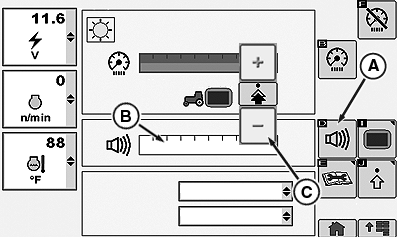
RXA0117796-UN-14JUN11Display Main Page
A - Adjust Volume Softkey
B - Adjust Volume Bar graph
C - Increase or Decrease Buttons
Select Menu button. -
Select Display.
-
Select Adjust Volume softkey (A) to highlight Adjust Volume bar graph (B), then use increase or decrease buttons (C) to make adjustment.
|
RW29387,000006C-19-20110921 |