Default Home Page
-
Select Menu button.

RXA0116492-UN-11MAY11CommandARM Controls Menu Button→Layout Manager Icon
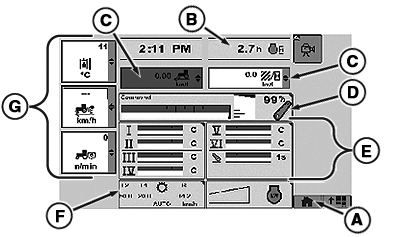
RXA0121994-UN-03NOV11Layout Manager—Selected Home Page
A - Home Softkey
B - Engine Hours
C - Drop Down Boxes
D - Rear Hitch
E - SCVs
F - Transmission
G - Left Region
-
Select Layout Manager
-
Page displayed is the most recent home page used. See Configuring Home page to display optional Home page.
-
Select Home Softkey (A) repeatedly until default Home page displays.
Default Home page is made up of configurable and static areas. Configurable areas are Default Home page configurable areas are drop down boxes (C), see Using Performance Monitor in this section for options and Left Region boxes (G), see CommandCenter™ in this section for options.
Default Home page static areas are:
- B — Engine Hours
- D — Rear Hitch
- E — SCV’s
- F — Transmission
|
CommandCenter is a trademark of Deere & Company |
RW29387,0000071-19-20111103 |