Setting Implement Width and Control Modes—Performance Monitor Settings

RXA0116494-UN-12MAY11
CommandARM™ Menu Button → Home → Performance Monitor Main Softkey
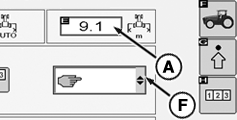
RXA0117366-UN-14JUN11
Performance Monitor Page
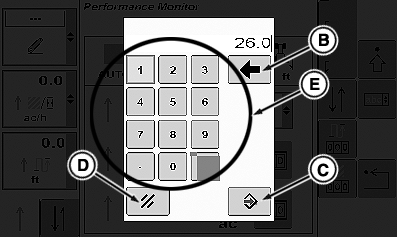
RXA0117364-UN-18MAY11
Performance Monitor Keypad Page
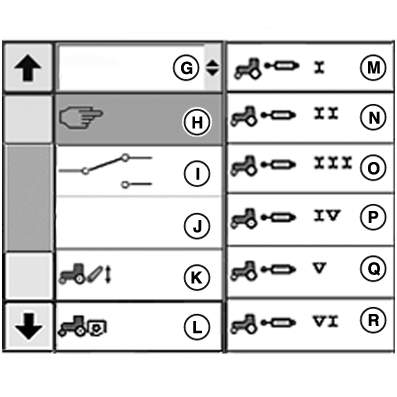
RXA0122388-UN-29NOV11
Area Counter Control Modes
A - Implement Width Softkey
B - Keypad Back Space Button
C - Keypad Enter/Save Button
D - Keypad Cancel Button
E - Keypad Keys
F - Area Counter Control Mode Drop Down Box
G - GreenStar™
H - Manual Mode
I - Switch Mode
J - Auto Mode
K - Rear Hitch Mode
L - Rear PTO Mode
M - SCV I Mode
N - SCV II Mode
O - SCV III Mode
P - SCV IV Mode
Q - SCV V Mode
R - SCV VI Mode
-
Select Menu button. Keypad displays.
-
Select Performance Monitor.
-
Select Performance Monitor Main softkey.
-
Select Implement Width softkey (A).
NOTE: When inputting implement width, if a number is entered incorrectly, select backspace button (B) or the entire entry is removed by selecting the cancel button (D).
-
Using keypad (E) enter implement width required, then select enter button (C).
Area Counter Control Modes are changed by selecting Area Counter Control Mode Drop Down box, make mode selection.
|
CommandARM is a trademark of Deere & Company GreenStar is a trademark of Deere & Company |
RW29387,0000073-19-20111130 |