Setting Service Interval—Performance Monitor Settings

RXA0116494-UN-12MAY11
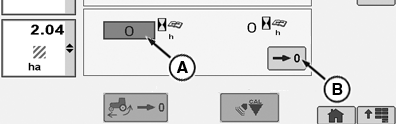
CommandARM™ Menu Button → Performance Monitor → Performance Monitor Settings
RXA0106064-UN-20AUG10
Performance Monitor Settings Page
RXA0106066-UN-15JUL10
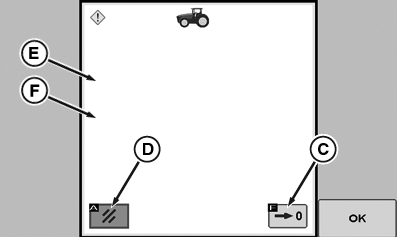
Reset Hours since Service Page
A - Service Alarm Interval Box
B - Reset Hours Since Service Box
C - Accept
D - Cancel
E - Reset Hours Since Service Hours-Text
F - Note: Text
Service Interval: Alarm interval is adjustable between 0 and 1000 hours, in 10-hour increments. When hours of operation reaches setting, service alarm will sound with a corresponding message appearing on CommandCenter.
After service is performed, Hours-Since-Service display should be reset to zero.
-
Select Menu button.
-
Select Performance Monitor .
-
Select Performance Monitor Settings softkey.
-
At Performance Monitor page go to Service Alarm Interval box (A) and select it.
-
Adjust service interval1.
-
Make selection when desired entry is displayed.
NOTE: Reset Hours Since Service button must be held for 3 seconds before hours will zero.
-
Go to Reset Hours Since Service Box (B) and select Time Since Last Reset button to reset time.
A Reset Hours Since Service screen will appear with following:
(E) - Are you sure you want to reset the total hours since service?
(F) - Note: If you have multiple displays connected, resetting the average totals on this display may reset the average totals on other displays as well.
|
CommandARM is a trademark of Deere & Company 1 If Using thumb wheel, rotate thumb wheel forward to increase or rearward to decrease hour setting displayed. |
RW29387,0000074-19-20110922 |