Using Foot Decelerator
IMPORTANT: Engine must be running to operate foot decelerator.
RXA0099745-UN-07NOV08
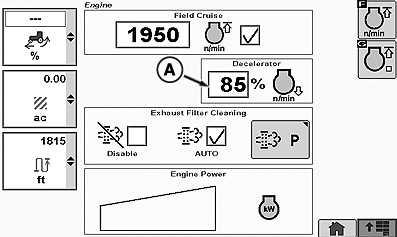
Engine
RXA0119432-UN-03AUG11
Engine Page
RXA0119445-UN-04AUG11
Decelerator
A - Decelerator Percentage
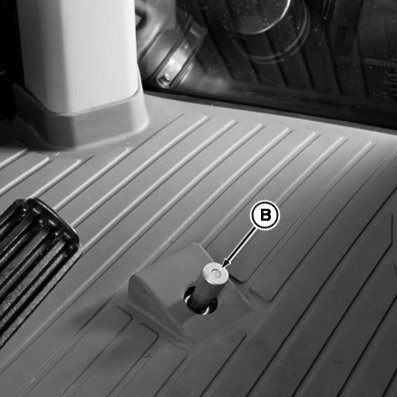
B - Foot Decelerator
Foot decelerator is used to slow down when turning at the end of the field.
Select the desired engine speed percentage decrease on the CommandCenter™ for certain field applications.
NOTE: When using Efficiency Manager™ and depressing the foot decelerator, transmission downshifts to the startup gear may occur in order to reduce wheel speed. To reduce the number of shifts see SETTING STARTUP GEAR in this section.
Depressing the foot decelerator is like pulling back on the engine speed control lever until foot decelerator is released.
How To Adjust Engine rpm Decelerator Percent:
-
Select the decelerator percent box (A) to adjust maximum engine (throttle) speed from 50 to 95 percent using CommandCenter™ display. Adjust with (+) to increase or (-) to decrease increments or rotate thumb wheel for desired engine rpm percentage. Rotate thumb wheel forward to increase or rearward to decrease maximum engine rpm speed percentage.
-
Push foot decelerator button (B) to lower engine rpm, Speed resumes when released.
|
RW29387,00000E2-19-20110804 |