Video Display Settings (Touchscreen CommandCenter™ Only) (If Equipped)

RXA0110766-UN-09SEP10
CommandCenter™ Menu Button → Video Softkey
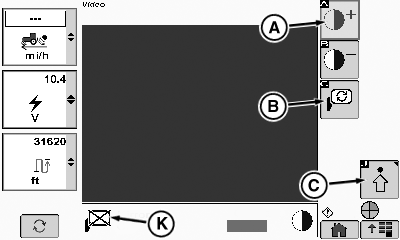
RXA0107758-UN-02AUG10
Video Page
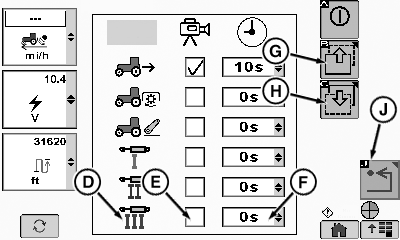
RXA0107759-UN-02AUG10
Video Settings Page
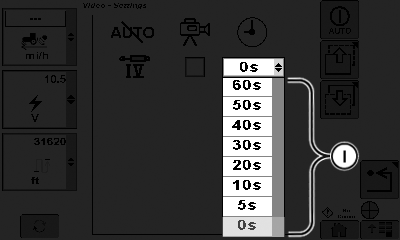
RXA0107760-UN-04JUN10
Extended Time Drop Down Box Options
A - Increase Contrast Softkey
B - Mirror Softkey
C - Advanced Softkey
D - Trigger Options
E - Trigger Option Check Box
F - Extended Time Drop Down Box
G - Page Up Softkey
H - Page Down Softkey
I - Extended Time Options
J - Back Softkey
K - Mirror Indicator
-
Select Menu button.
-
Select Video softkey.
-
Select softkeys plus or minus (A) to adjust video focus.
NOTE: Selecting mirror softkey allows operator to choose either a mirror image or a standard view of what the camera is viewing.
-
Select mirror softkey (B). Mirrored image will be on and displayed at mirror indicator (K) or off and mirror indicator displays an X as shown.
-
Select advanced settings softkey (C).
NOTE: Trigger is an action which will cause video page to display live camera image. Operator can set video page to start and end when trigger event starts and stops. Additionally, the time the video page is active can be extended beyond end of trigger event to provide additional viewing. Extended time display can be set from 5 to 60 seconds.
For example: if hitch is the trigger and extended time is set to 0, video page activates precisely when hitch is activated. Video page display ends immediately when hitch movement is complete. If extended time is set to 60 seconds, video page activates at moment when hitch is activated, then remains active 60 seconds after hitch movement is complete.
Up to six trigger options are displayed per page. If more than six options are available, select page up softkey (G) or down softkey (H) to view additional options.
-
Select desired trigger from options (D) available on left side of page and select check box (E) for appropriate trigger.
-
Select drop down box (F) in page right column to select desired extended time (I).
-
Select Back softkey (J) to return to previous page.
|
RW29387,000013F-19-20121130 |