Setting Cab Lighting
-
Select Menu button.
-
Select Display.
RXA0098156-UN-07NOV08CommandARM™ Menu Button
RXA0099747-UN-14JUL10Display
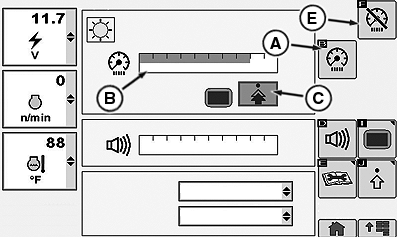
RXA0106037-UN-14JUL10Display Main Page — Day Lighting
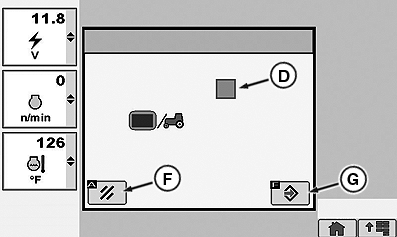
RXA0106039-UN-14JUL10Backlight Settings Page
A - Cab Dim Softkey
B - Cab Dim Bar Graph
C - Sync With Cab/Stand Alone Toggle Button
D - Sync With Cab Box
E - Dim Mode Display Softkey
F - Cancel
G - Confirm Button
-
Selecting Cab Dim softkey (A) navigates to Cab Dim bar graph (B).
NOTE: As bar graph value goes up, cab lighting brightens. As bar graph value decreases, cab lighting dims.
-
Select toggle button (C) to toggle between either stand alone mode or synchronization with cab mode (D).
NOTE: Selecting Dim Mode softkey (E) darkens CommandCenter™. This feature allows operator to go from field operations when CommandCenter is required to driving on road without CommandCenter when illumination may effect drivers night vision.
-
Make selection between Sync With Cab or Stand Alone mode or , cancel (F).
|
CommandARM is a trademark of Deere & Company CommandCenter is a trademark of Deere & Company |
RW29387,000070A-19-20100715 |