Operating PTO (If Equipped)
RXA0109304-UN-04AUG11
RXA0120173-UN-01SEP11
Corner Post Display
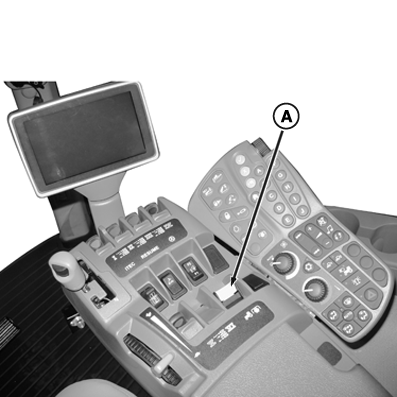
A - PTO Switch
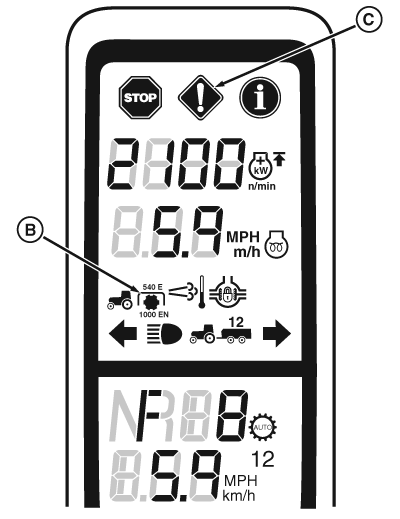
B - PTO Indicator
C - Service Alert indicator
 CAUTION: Avoid personal injury. Stop the engine and allow the
PTO driveline to stop before making adjustments, connections, or cleaning
of PTO driven equipment.
CAUTION: Avoid personal injury. Stop the engine and allow the
PTO driveline to stop before making adjustments, connections, or cleaning
of PTO driven equipment.
Always disengage the PTO when not in use. Make sure everyone is clear of rotating parts.
IMPORTANT: Rapid engagement of PTO will result in damage to PTO driveline and implement.
Ensure PTO engagement rate is set correctly. See next page SETTING REAR PTO ENGAGEMENT RATE.
NOTE: Service Alert indicator (C) light will flash, a message appears on CommandCenter display, and an audible warning signal sounds if operator leaves seat with PTO engaged. PTO does not disengage when operator is out of seat.
PTO is engaged or disengaged without using the transmission inching foot pedal.
If engine is stopped and then restarted while PTO is engaged, the PTO will not operate. A “Rear PTO switch disabled” message will appear. Disengage PTO switch and then engage the PTO switch again.
Using Correct Engine Speed
Correct speed is very important. For standard PTO speed (1000 rpm), operate engine at 1900 engine rpm.
A warning alarm and PTO warning light will appear on the vehicle monitor as long as a PTO overspeed exists.
Engaging The PTO
- Push PTO control switch (A) down and forward to engage PTO clutch.
- PTO indicator icon (B) on display will appear. PTO is fully independent and not affected by traction clutch.
Disengaging The PTO
IMPORTANT: Make sure implement has stopped before shutting off engine. Loss of cooling hydraulic oil can cause PTO brake damage.
- Idle engine before disengaging PTO clutch switch.
- Pull PTO switch back to disengage clutch. The PTO brake will engage automatically to stop the PTO shaft.
|
RW29387,000078F-19-20121130 |