Hydraulic System Warm-Up—Standard or High Flow
RXA0106454-UN-14OCT10
RXA0106101-UN-29JAN10
RXA0099479-UN-14OCT08
RXA0110031-UN-24SEP10
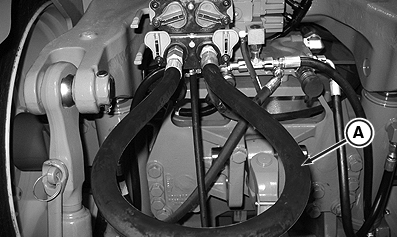
A - Jumper Hose
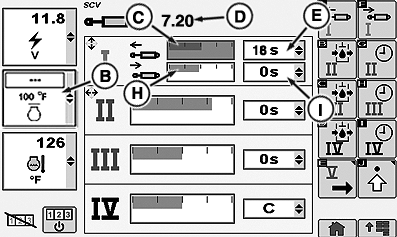
B - Hydraulic Temperature Display
C - Extend Flow Bar Graph
D - Flow Input Box
E - Extend Time Drop Down Box
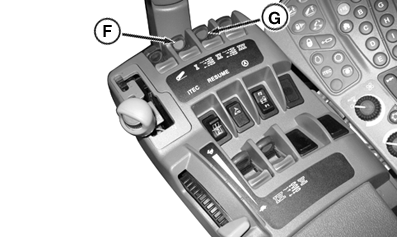
F - SCV I Lever
G - SCV II Lever
H - Retract Flow Bar Graph
I - Retract Time Drop Down Box
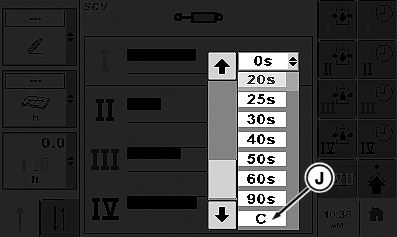
J - Continuous Setting
Avoid operating tractor under load until transmission/hydraulic/axle system has warmed up. When startup oil temperature is low, oil will move to the axles and not return until tractor is moved.
Hydraulic oil warm-up temperature of 50°C (122°F) is recommended for continuous use applications, such as air seeders. Use CommandCenter™ hydraulic temperature screen to check hydraulic oil temperature (see CommandCenter Left Region in CommandCenter section).
-
Install a jumper hose into SCV I coupler (A).
-
Operate engine at 1500 rpm under no load.
-
Press SCV button at Cab Switch Module.
-
In the screen left region activate hydraulic temperature screen (B).
-
Select SCV I extend detent flow bar graph (C).
-
Rotate Cab Switch Module thumb wheel, clockwise to increase or counterclockwise to decrease detent flow setting. Set SCV I detent flow at 7.2 (D) for temperatures above -10°C (14°F). For temperatures below -10°C (14°F), do not set detent flow higher than 4.0.
-
Select arrows in SCV I extend time box (E).
-
At the pull down menu scroll down to C, continuous (J), then press Cab Switch Module confirm button.
-
Pull SCV I lever (F) to extend. For faster oil warm-up, move SCV II lever (G) into the detent position during SCV I flow.
-
Select SCV I retract detent flow bar graph (H).
-
Rotate Cab Switch Module thumb wheel, clockwise to increase or counterclockwise to decrease detent flow setting. Set SCV I detent flow at 7.2 (D) for temperatures above -10°C (14°F). For temperatures below -10°C (14°F), do not set detent flow higher than 4.0.
-
Select arrows in SCV I retract time box (I).
-
At the pull down menu scroll down to C, continuous (J), then press Cab Switch Module confirm button.
-
Monitor left region hydraulic temperature screen until temperature reaches 38° C (100 ° F).
NOTE: To maintain oil temperature in extremely cold conditions, release SCV II but permit oil to flow through SCV I once working oil temperature is achieved. Operation under load can be performed with oil flow through SCV I.
-
Return SCV I and SCV II lever to neutral position.
-
Disconnect jumper hose.
|
CommandCenter is a trademark of Deere & Company |
RW29387,0000809-19-20101026 |