Configuring Lights
RXA0107022-UN-26MAR10
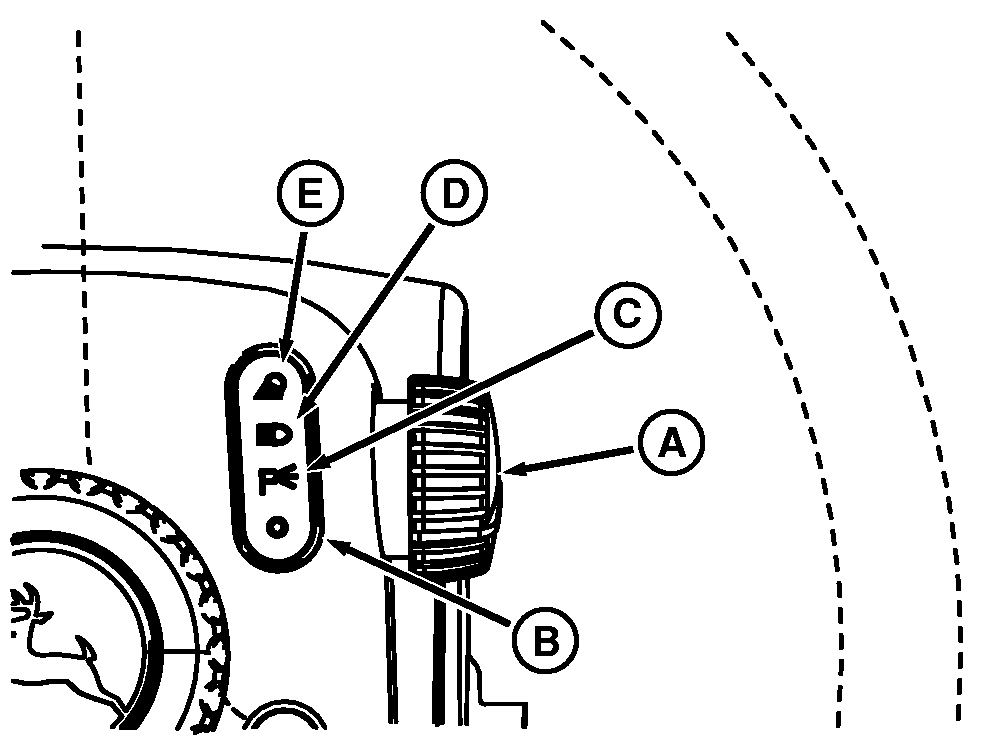
Steering Column Light Switch
RXA0108218-UN-23NOV10
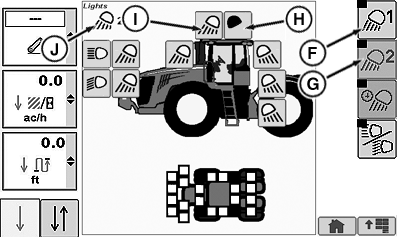
CommandCenter™ Lighting Page
A - Selector Knob
B - Lights, OFF Position
C - Lights, Park Position
D - Lights, Road Position
E - Lights, Field Position
F - Field Lights 1 Soft Key
G - Field Lights 2 Soft Key
H - Light Configured OFF
I - Light Configured ON
J - Flood Light Position Indicator
On steering wheel, turn selector knob (A) to either road position (D) which control head, warning, and tail lights or field position (E) which control hood field lights, rear fender and cab work lights or parking position (C) which control front road and rear tail lights.Operation of all white lights or Field Lights is programmable using the light switches on the steering wheel and CommandARM™ controls. See Road And Field Light Identification With CommandCenter™ Indicators for further information on lights and display indicators.
Light display shows for 3 seconds whenever light switch is changed to a programmable setting. If no changes are made, display returns to last screen shown. Light indicators change from black-to-white when programmed ON.
In the OFF position, all clear lens lighting is programmed OFF (all black indicators). Changes to on-off settings take place immediately.
Turn selector knob (A) to desired position and observe CommandCenter™ page. Selecting field position 1 soft key (F), controls field position 1 lights. Selecting field position 2 soft key (G), controls field position 2 lights. Selecting individual lights toggle lights on (I) or off (H). Field position indicator (J) identifies current field position. Each field position can be programmed to operate selected clear lens lights.
 CAUTION: Avoid injury caused by accidental collision with another
vehicle. Always comply with traffic regulations when driving tractor
on a road. Dim headlights to low-beam for oncoming vehicles. Avoid
using Field Lights which could blind or confuse other drivers.
CAUTION: Avoid injury caused by accidental collision with another
vehicle. Always comply with traffic regulations when driving tractor
on a road. Dim headlights to low-beam for oncoming vehicles. Avoid
using Field Lights which could blind or confuse other drivers.
Standard Lighting has four positions (B—E) which operates regardless of key position.
OFF Position (B):
Turns off all lights.
NOTE: Refer to Programming Field Lights for lighting set up information. Programmable lighting display is at lower right-hand corner of previous Light Identification page. Programmable lights are A, B, C, D, E, F, H, I, K and L.
Park Position (C):
Turns on front road lights (high or low beam) and red tail lights.
Road Position (D):
Selected by turning the knob on the upper right steering column and observed at CommandARM™ Controls lower right side.
Turns on high beam or low beam road lights (B or C), red tail lights (P), flashing front (G) and rear roof hazard lights (K) and extremity transport lights (U).
Field Position (E):
NOTE: Refer to previous Light Identification page.
Selected by turning the knob on the upper right steering column and observed at CommandARM™ Controls lower right side.
Turns on clear lens lighting (B, C, E, F, H, I, K and L) programmed for either field position 1 (Q) or field position 2 (R).
CommandARM™ Controls indictor lights (T) are only to indicate the status of hood lights.
Automatic Battery Protection Feature
To prevent battery discharge if headlights or field lights are left on accidentally after shutting off engine. Electrical system will automatically start the following sequence:
- After 30 minutes have elapsed, lights will turn on and off 5 times.
- After fifth time, lights will turn back on and stay lit for about 60 seconds.
- After 60 seconds, lights will go off and stay off to prevent complete battery discharge.
|
CommandCenter is a trademark of Deere & Company CommandARM is a trademark of Deere & Company |
RX32825,00003A6-19-20120307 |