Configuring Selective Control Valves On CommandCenter™ - Access Settings
RXA0117606-UN-10JUN11
CommandARM Menu Button → SCV Softkey
RXA0121755-UN-27OCT11
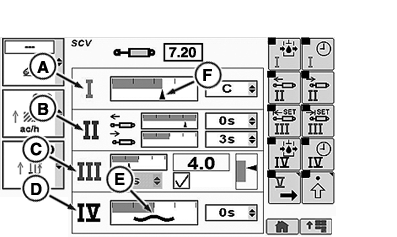
SCV Homepage
A - SCV I—Standard Mode
B - SCV II—Independent Mode
C - SCV III—Feature Mode
D - SCV IV—Float Operation
E - Float Symbol
F - Current Flow Bar Graph Indicator
- Select Menu button.
- Select SCV softkey.
Each SCV can be configured to three different modes: standard mode displayed in SCV I (A), independent mode displayed in SCV II (B) or feature mode displayed in SCV III (C).
NOTE: Current estimated SCV flow is indicated by current flow bar graph indictor (F).
Additionally when SCV is set to float as in SCV IV (D) the CommandCenter display for that individual SCV will show float symbol (E).
|
RX32825,0000416-19-20120626 |