Configuring Selective Control Valves On CommandCenter™ - Feature Mode
RXA0117610-UN-10JUN11
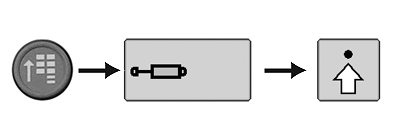
CommandARM Menu Button → SCV Softkey → Advanced Settings Softkey
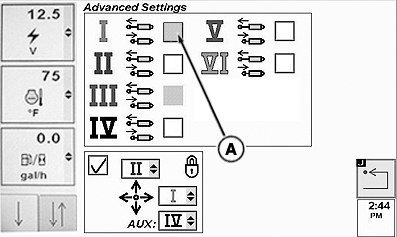
RXA0102101-UN-19MAY09
SCV Advanced Settings Page
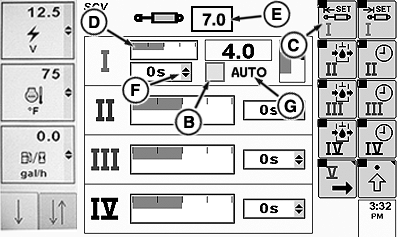
RXA0102614-UN-06MAY09
SCV Homepage
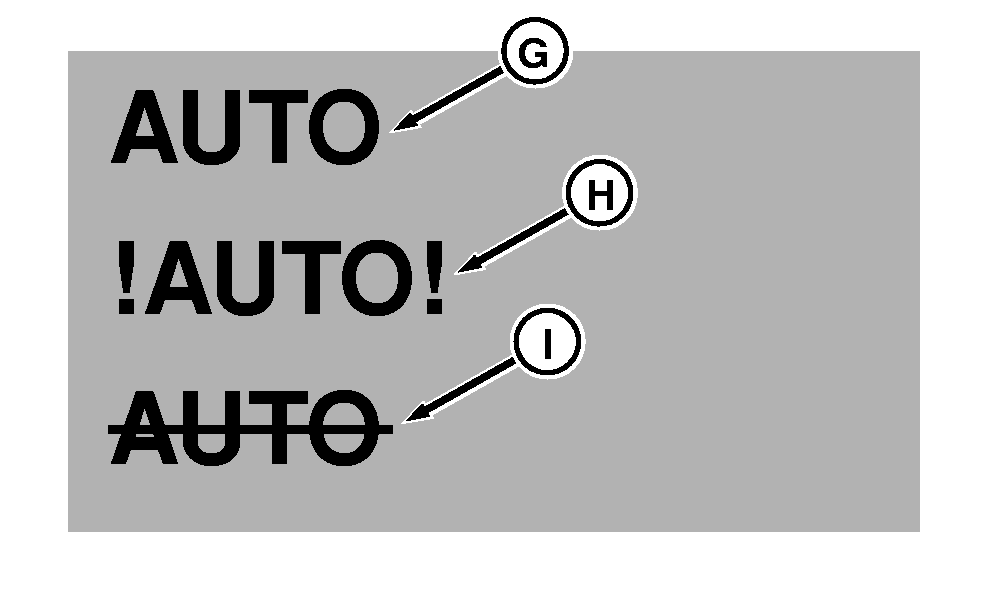
RXA0102615-UN-06MAY09
A - Independent Mode Check Box
B - Feature Mode Check Box
C - Extend Set Softkey
D - Detent Flow Bar Graph
E - Detent Flow Value Box
F - Detent Time Drop Down Box
G - Feature Status Indicator (Normal Operation)
H - Feature Status Indicator (Fault Identified)
I - Feature Status Indicator (Turned Off)
NOTE: To use feature mode, connect implement to tractor. When connected through CAN Bus or implement connector, SCV(s) will automatically enter feature mode. SCV page with feature option will be displayed for selected SCVs. On advanced page, specified SCV independent mode check box (A) is grayed out.
Available feature modes are:
- TouchSet depth control
- AccuDepth control
- Laser Scraper control
- ISOBUS control
-
Connect tractor to implement.
-
Select Menu button.
-
Select SCV softkey.
-
Select Advanced Settings softkey.
-
Select Extend Set softkey (C) to navigate to detent flow bar graph (D). Press Confirm button to highlight. Rotate thumb wheel to adjust flow, then press Confirm button again.
NOTE: Bar graph (D) depicts detent flow. Amount of detent flow is shown in box (E).
AUTO (G) indicates normal feature operation. !AUTO! (H) indicates a fault and feature mode is inoperable. AUTO with a strike through it (I) indicates feature is not active.
NOTE: Detent time drop down box (F) can only be adjusted when feature mode check box (B) is unchecked. See Configuring Selective Control Valves On CommandCenter™ - Standard Mode. If feature mode check box is checked, detent time cannot be adjusted. Use Standard Mode when adjusting detent time.
-
To adjust detent, rotate thumb wheel to check box (B) to left of AUTO (G), then press Confirm button. AUTO will have a strike through it, check box will be unchecked.
|
RX32825,0000419-19-20120626 |