Using iPod® — Premium Radio
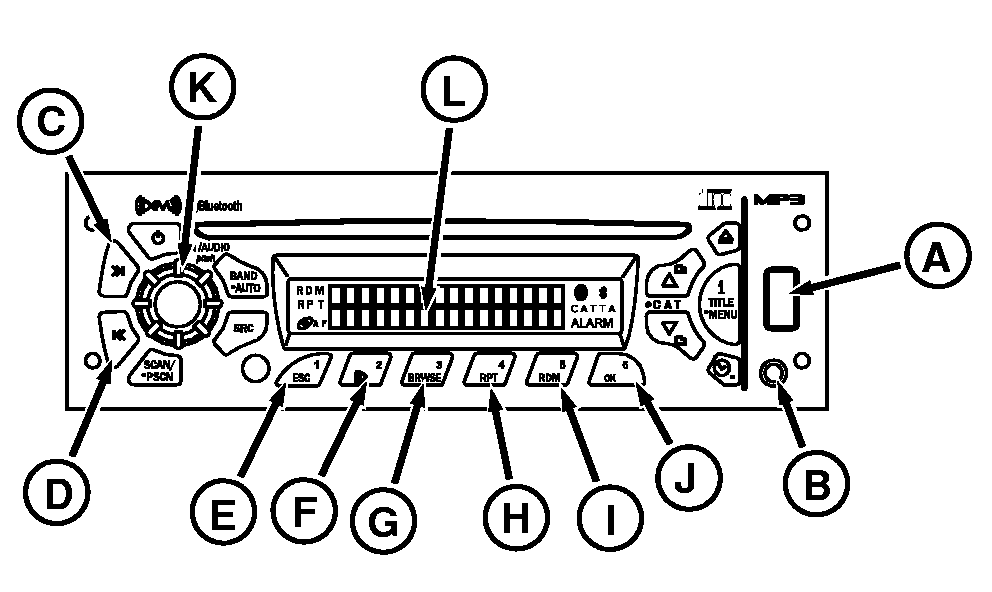
RXA0100816-UN-06MAY09
Radio With CD Player
A - USB Connector
B - Radio Aux Input
C - SEEK >> Button
D - SEEK<< Button
E - ESC Button
F - Pause/Play Button
G - BRWSE Button
H - RPT Button
I - RDM Button
J - OK Button
K - Audio Knob
L - Display
Radio is capable of controlling and playing music from iPod. Only the following models have faceplate browsing features.iPod Nano
iPod 2G Nano
iPod 3G Nano
iPod 5G Classic
Other iPod models not supported can still be played through Aux port on radio, but no browsing features are available.
Insert iPod USB cable connector to radio USB connector (A) (the other end connected to your iPod). iPod READING appears on display (L). Insert 3.5 mm Audio cable connector to radio Aux input jack connector (B) (the other end connected to iPod 3.5 mm audio jack connector). If Audio cable is not connected, radio will display FRONT AUX JACK UNPLUGGED. After all connections have been made, and radio has finished reading iPod, iPod will begin playing. Elapsed time and track number are displayed. Play begins from current track played on iPod and continues sequentially through all tracks from the iPod last selected mode. After playing iPod last track last selected mode, play stops and radio displays iPod Menu. Buttons Functions:
-
SEEK >> (C) :
- Press for less than 2 seconds to forward to next track.
- Press and hold to fast forward.
- Release button, track continues playing.
-
SEEK << (D):
- Press for less than 2 seconds to go to the beginning of current track.
- Press within first 10 seconds of track, radio goes to the previous track.
- Press button within the first 14 second to go to the beginning of previous track.
- Press and hold button to fast reverse.
- Release button, track will continue to play.
- ESC (E): Press to exit or go back to previous menu when on a menu.
-
PAUSE/PLAY (F):
- Press to pause a track, ”PAUSE” will be displayed and the audio will be muted.
- Press PAUSE/PLAY again to resume playing the track.
-
BRWSE (G): Press BRWSE button to enter
iPod Menu and the following options.
- Scroll and select with the On/AUDIO Knob (K).
- Turn to right to increase, left to decrease and press knob to confirm selection.
-
RPT (H): If RPT is pressed a second
time REPEAT ALL TRACKS appears on display and RPT icon remains turned
on. The same folder/playlist (iPod last selected mode) will continue
to play until RPT button is pressed again. If RPT is pressed a third
time, REPEAT OFF will appear on display. Function is off and RPT icon
is off. Then display returns to default.
- Press button once to repeat current track. RPT icon & REPEAT ONE TRACK will appear on display
- The same file will continue to play until the RPT button is pressed again.
-
RDM (I): press RDM button again to
reach SHUFFLE OFF.
- Pressing button activates shuffle tracks, albums or OFF selection. RDM icon on display indicates that this feature is on.
- Press button again to cancel SHUFFLE TRACKS or SHUFFLE ALBUMS.
- OK (J): Press OK Button when on a menu to confirm selection.
To remove iPod USB cable connector simply pull the device. Radio will return to previous mode/source.
|
iPod is a trademark of Apple,Inc. |
ZE59858,000081E-19-20111101 |