Manual Vehicle Speed Calibration—Performance Monitor Settings
RXA0116559-UN-20JUN11
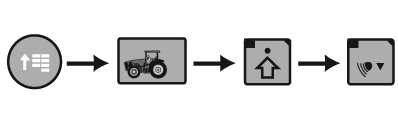
CommandARM™ Menu Button → Performance Monitor → Performance Monitor Settings → Calibrate Radar
RXA0117184-UN-09JUN11
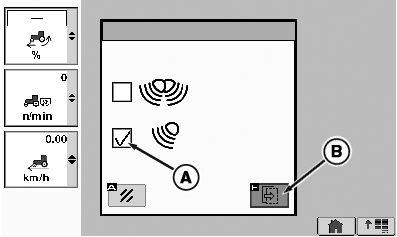
Calibration Box
A - Other Radar Check Box
B - Calibration Box
NOTE: The Vehicle Speed Calibration (Manual) procedure is not used with John Deere™ Dual Beam Radar.
Automatic vehicle calibration is used with John Deere™ Dual Beam radar or GPS signal device. See VEHICLE SPEED CALIBRATION (AUTOMATIC) in this Section.
Ttractors equipped with no radar or single beam radar, a change in tire size or loading of tractor can affect wheel and ground speed which requires recalibration.
-
On a hard level dry surface, mark out a 400 ft. (122 m.) course. Place easily visible markers at the start and end of the course.
-
Drive tractor up to, but do not cross, course start line.
-
Select Menu button.
-
Select Performance Monitor.
-
Select Performance Monitor Settings softkey.
-
At the bottom of the Performance Monitor Settings page, select Calibrate Radar button.
-
Select ”Other RADAR” which automatically places check in check box (A).
-
Select calibration Box (B) and proceed on course.
-
Calibration results then display.
Calibration Results
If Calibration is Successful
If Calibration is Unsuccessful
Calibration
SuccessfulCalibration
Unsuccessful -
If failed message is received, perform procedure again.
NOTE: If after 3 attempts vehicle speed calibration is unsuccessful, see your John Deere dealer.
|
CommandARM is a trademark of Deere & Company John Deere is a trademark of Deere & Company CommandCenter is a trademark of Deere & Company |
OURX935,0000A61-19-20120413 |