SCV and Joystick Flow Response Setting
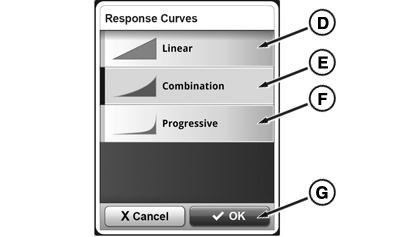
SCV and Joystick response can be set to three different response curves: Linear, Progressive and Combination.
- Linear means that the flow rate of the SCV corresponds to the distance traveled by the SCV control lever / joystick lever.
- Progressive means that initially the flow rate of the SCV is less than that traveled by the SCV control lever / joystick lever (giving a more sensitive start to the movement).
- Combination is an intermediate stage between the two settings described above.
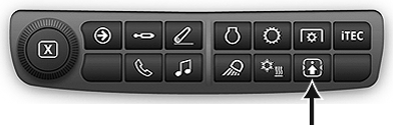
RXA0133715-UN-16JUL13
SCV Shortcut Button on Navigation Bar
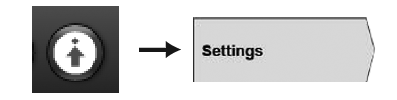
RXA0130326-UN-11JAN13
Advanced Settings Icon
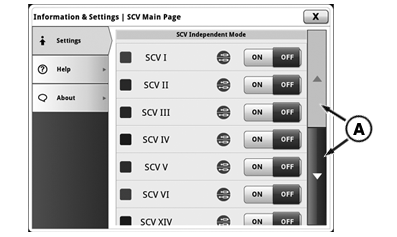
RXA0137874-UN-18DEC13
Information and Settings Page
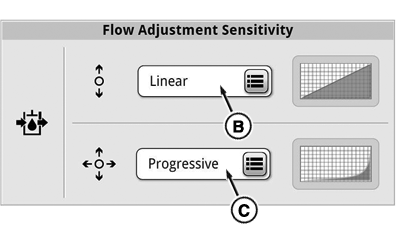
RXA0137875-UN-18DEC13
Flow Adjustment Sensitivity
RXA0137876-UN-18DEC13
Response Curves
A - Scroll Bar
B - SCV Control Lever Response Setting button
C - Joystick Response Setting button
D - Linear Response button
E - Combination Response button
F - Progressive Response button
G - OK button
Using scroll bar (A), scroll down to flow adjustment sensitivity and press either SCV control lever (B) or joystick response (C) to adjust SCV response or joystick response.
Then choose either Linear (D), Combination (E) or Progressive (F), then confirm using the OK button (G).
|
RD47322,00004CD-19-20140617 |