Select PTO Cruise Speed
RXA0133713-UN-16JUL13
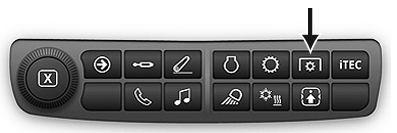
PTO Shortcut Button on Navigation Bar
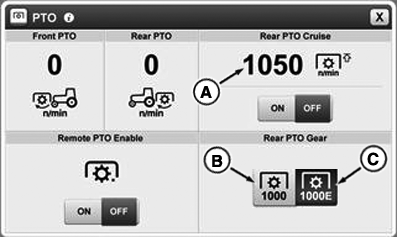
RXA0144644-UN-22AUG14
A - PTO Standard Speed
B - PTO Speed 1000E
C - PTO Speed 1000
 CAUTION: Before engaging PTO, make sure that selected PTO speed
is correct for attached implement. Incorrect PTO speed could result
in severe damage to implement.
CAUTION: Before engaging PTO, make sure that selected PTO speed
is correct for attached implement. Incorrect PTO speed could result
in severe damage to implement.
NOTE: PTO must be disengaged to select standard PTO speed.
Operating both Front PTO (if equipped) and PTO is described in Operating Front PTO (if equipped) and Operating PTO sections of this Operator’s Manual.
-
Select PTO icon on navigation bar to access PTO module.
-
Select desired PTO speed (B) or (C).
-
PTO standard speed (A) appears in display window. It can be activated or deactivated using ON/OFF buttons located below PTO standard speed (A).
CAUTION: Engine must be shut off when an implement is being
connected.
|
GH15097,000084F-19-20140904 |