Fine Adjustment To PTO Cruise Speeds
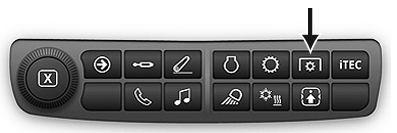
RXA0133713-UN-16JUL13
PTO Shortcut Button on Navigation Bar
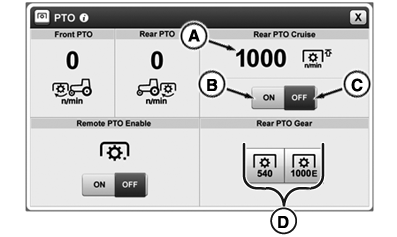
RXA0144647-UN-22AUG14
PTO Cruise Information
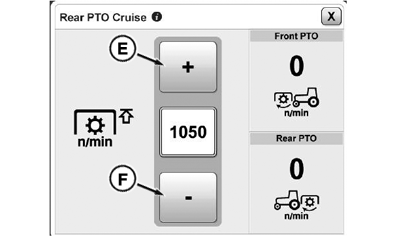
RXA0137730-UN-16DEC13
PTO Cruise increase and decrease value
A - PTO Standard Speed
B - Maximum PTO Speed Active
C - Maximum PTO Speed Deactivated
D - Standard Speed Options
E - Increase Value
F - Decrease Value
If desired, maximum PTO speed can be set. Select PTO icon on navigation bar and press PTO standard speed (A) to access PTO cruise module.
Select increase value (E) and decrease value (F) softkeys in PTO cruise module to input desired maximum PTO speed. Close module and press ON button to activate maximum PTO speed (B).
When maximum PTO speed is activated, engine speed is restricted so that set PTO speed is not exceeded, even at full throttle. When PTO is switched off, engine can be operated at its full speed range again.
NOTE: If engine speed limit is set on engine settings page (see Settings in relevant Operating the Tractor Section in this Operator’s Manual), lower limit applies.
|
GH15097,0000850-19-20140827 |